
S3 Site Replication
The screenshots illustrate the English user interface. Names and addresses shown are examples; use the values defined for your environment.
Purpose and audience
This guide is for system and storage administrators who configure asynchronous S3 replication between independent eEKAS clusters. All procedures use the euroNAS graphical interface; no command-line access is required.
Terminology
| Term | Meaning |
|---|---|
| Primary site | The current authoritative write site. |
| Secondary site | A remote site receiving asynchronous changes. |
| S3 service | The configured object-storage service, endpoint and backing Ceph storage. |
| IP Group | Service addresses and ordered eligible gateway nodes at one cluster. |
| Disaster recovery mode | Secondary site remains read-only until controlled promotion. |
| Active-active mode | Writes are allowed at more than one site; use only with compatible applications. |
| Invitation | Short-lived trust package used once to join a destination site. |
Prerequisites
- Two healthy, independent eEKAS clusters.
- A configured and reachable S3 service at the primary site.
- A configured but empty S3 service at the destination site.
- Adequate destination capacity and an appropriate Ceph protection policy.
- Stable DNS names for both S3 service endpoints.
- HTTPS management connectivity from destination to primary on port 18443 for online invitations, or a secure method to transfer an encrypted invitation file.
- S3 endpoint connectivity between sites on the configured service ports.
- Synchronized time, valid certificates and working name resolution on every gateway node.
- A documented RPO, RTO, promotion authority and client-redirection method.
Planning worksheet
| Item | Primary site | Destination site |
|---|---|---|
| Site name | primary-site-01 | secondary-site-01 |
| S3 service | eu-west-1 | empty destination service |
| S3 DNS name | s3.primary.example | s3.secondary.example |
| S3 service port | 443 or configured port | 443 or configured port |
| Management address | HTTPS address, port 18443 | Not required for invitation redemption |
| IP Group | Name and gateway order | Name and gateway order |
| Mode | Authoritative write site | Disaster recovery by default |
1. Configure the IP Group at each site
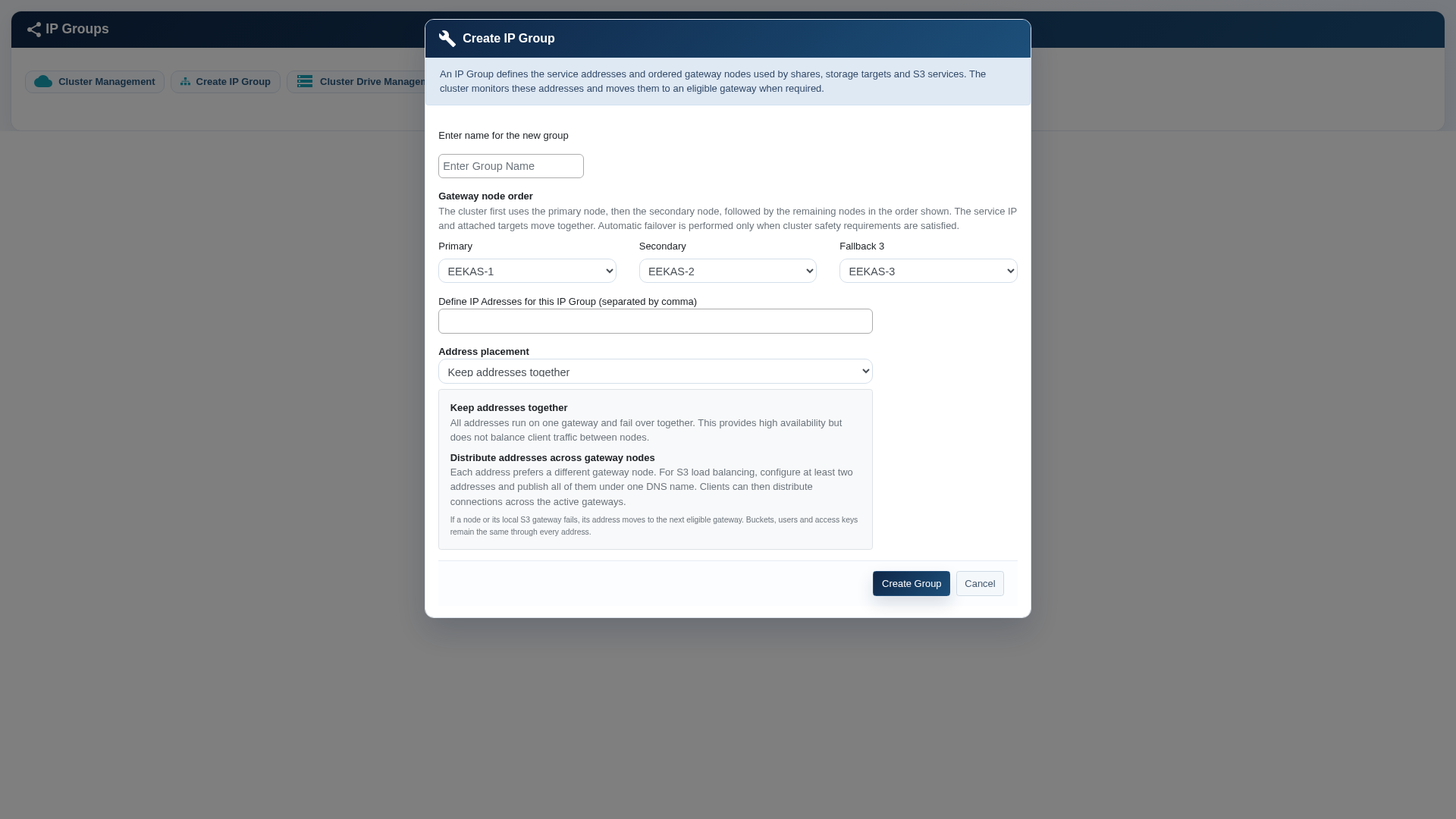
Open Cluster Management and select Create IP Group. Define a neutral group name, the ordered gateway nodes and one or more service addresses. With one address, the service runs through one gateway at a time. Multiple distributed addresses can spread client connections when all addresses are published under one DNS name.
- Place the preferred gateway first and define secondary and fallback nodes.
- Select Keep addresses together for a simple active/passive service address.
- Select Distribute addresses across gateway nodes only when at least two addresses and suitable DNS client distribution are available.
- Verify that the address network is reachable from S3 clients.
2. Create the S3 services
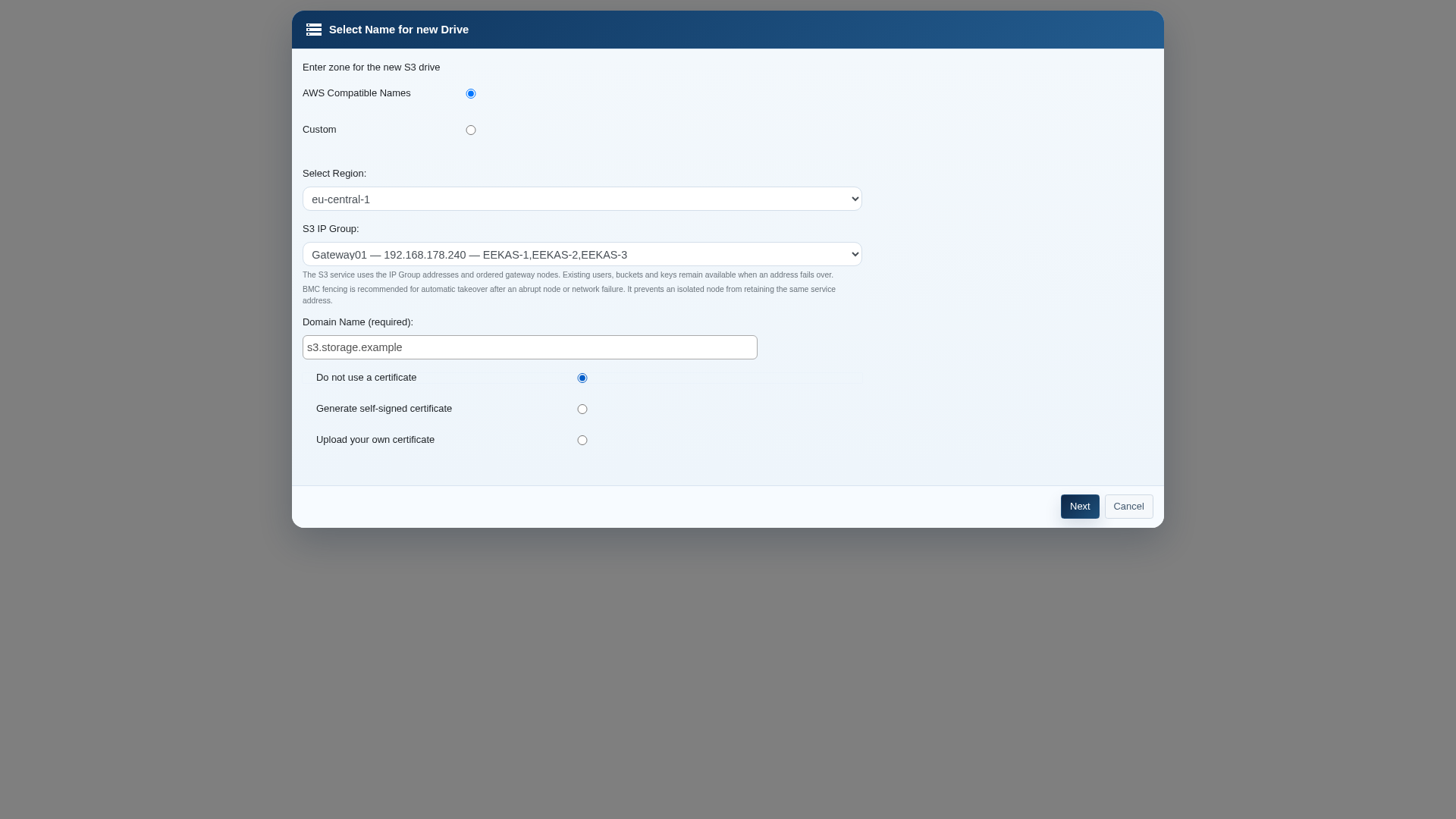
Create the primary S3 storage service and assign its IP Group, DNS name, certificate choice and local storage. At the destination, create a separate S3 service with its own IP Group and storage, but do not create buckets or upload objects. Only an empty destination service can be adopted by the replication topology.
3. Enable replication at the primary site
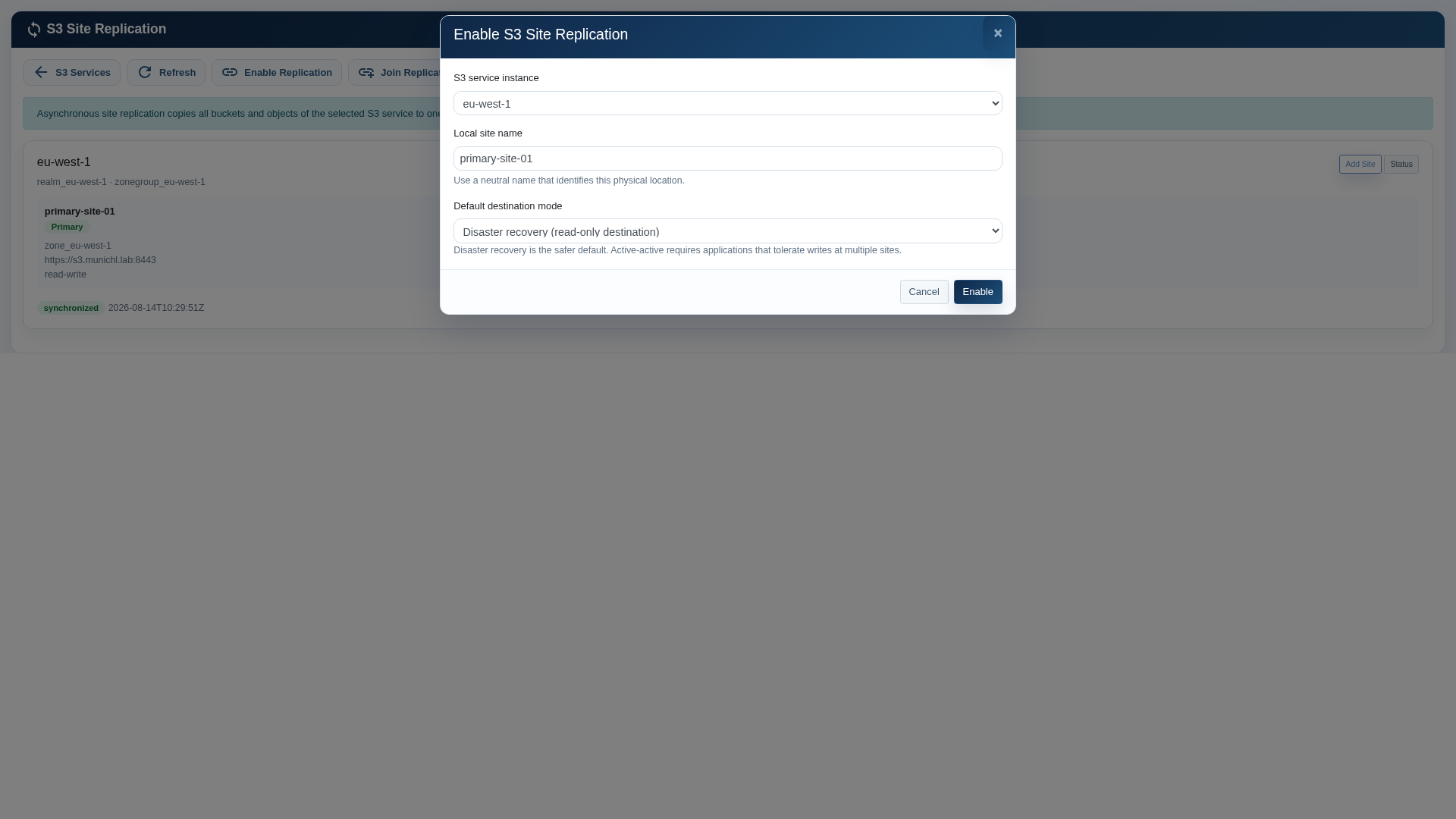
Open S3 Console, choose Site Replication and select Enable Replication.
- Select the S3 service instance to protect.
- Enter a neutral physical site name, for example primary-site-01.
- Select Disaster recovery unless the application has been validated for concurrent multi-site writes.
- Select Enable and wait for the relationship to appear.
4. Create a destination invitation
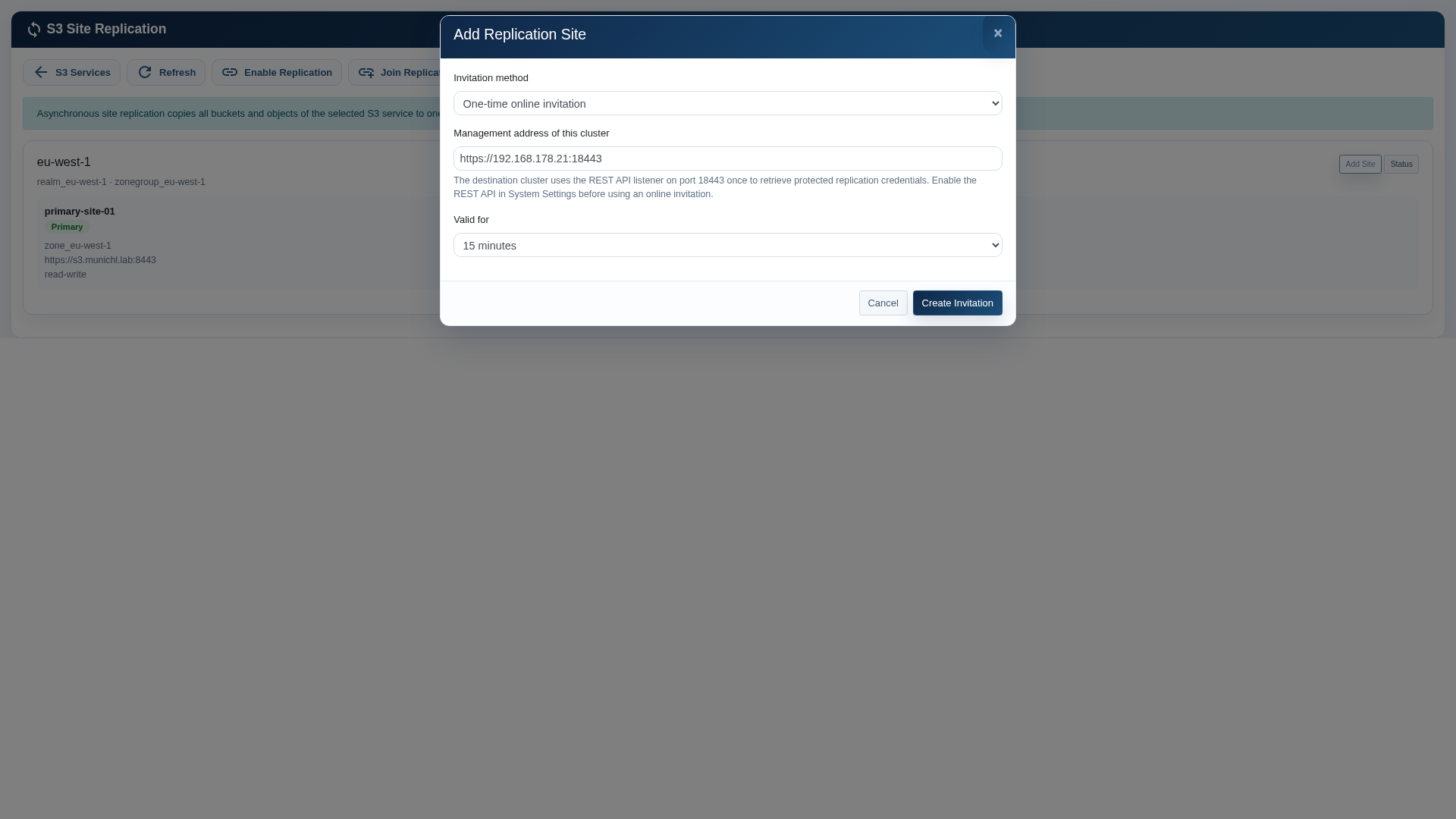
On the primary relationship, select Add Site. For normal connected deployments, choose One-time online invitation.
- Confirm the primary management address and HTTPS port 18443.
- Choose the shortest practical invitation lifetime.
- Select Create Invitation and securely copy the one-time token and displayed management address.
- Use the encrypted invitation-file method when the destination cannot reach the primary management listener. Transfer the file and its passphrase through separate secure channels.
5. Join the destination site
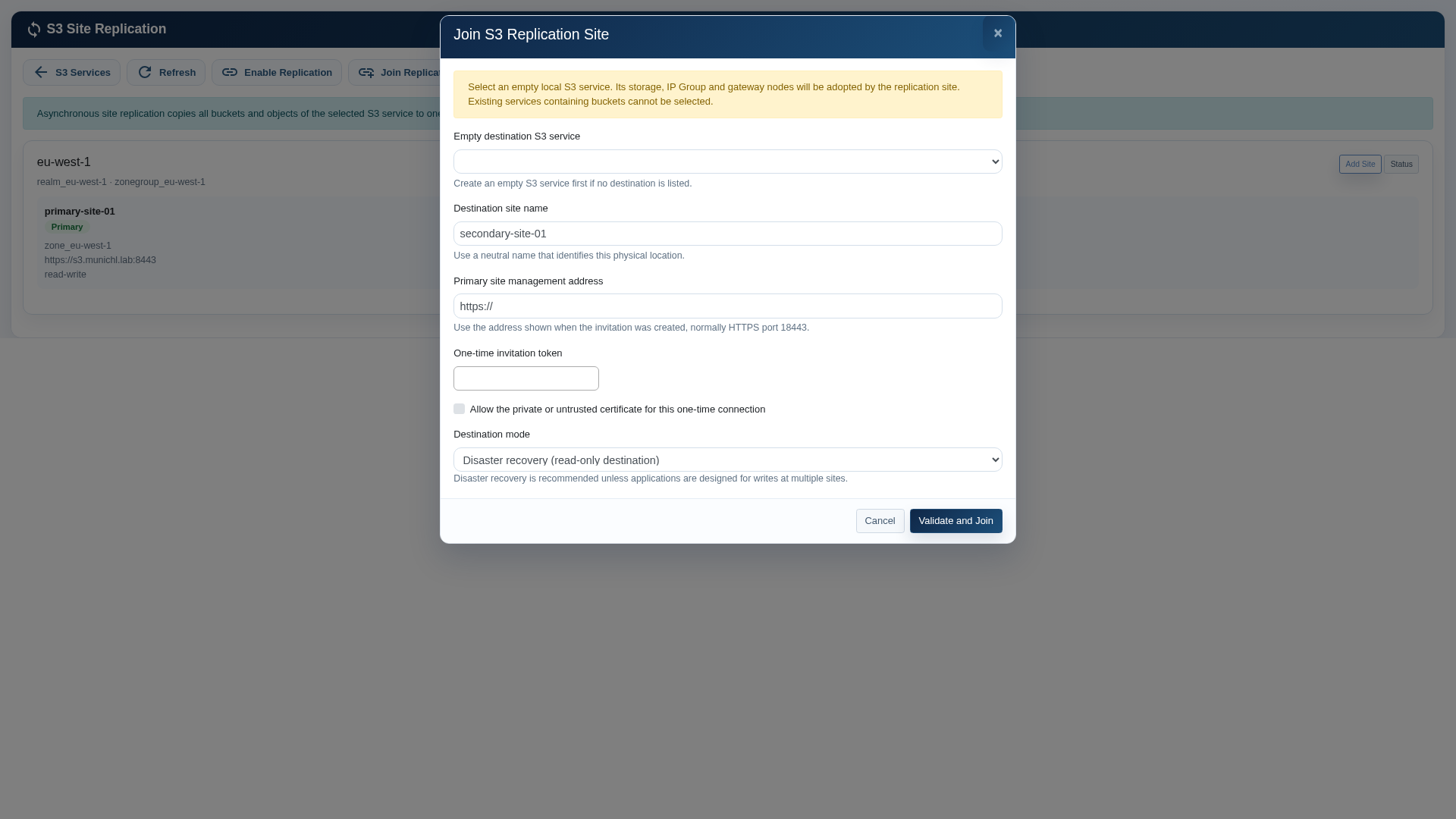
Sign in to the destination cluster, open S3 Console, choose Site Replication and select Join Replication Site.
- Select the empty destination S3 service. Its storage, IP Group, listener port and gateway-node selection will be adopted.
- Enter a neutral destination site name.
- Enter the primary management address and one-time invitation token.
- Select Allow the private or untrusted certificate only for a controlled laboratory or private-certificate bootstrap where the certificate has been independently verified.
- Keep Disaster recovery as the destination mode unless active-active operation has been approved.
- Select Validate and Join. Do not close the page while the destination gateway is being deployed.
6. Verify synchronization
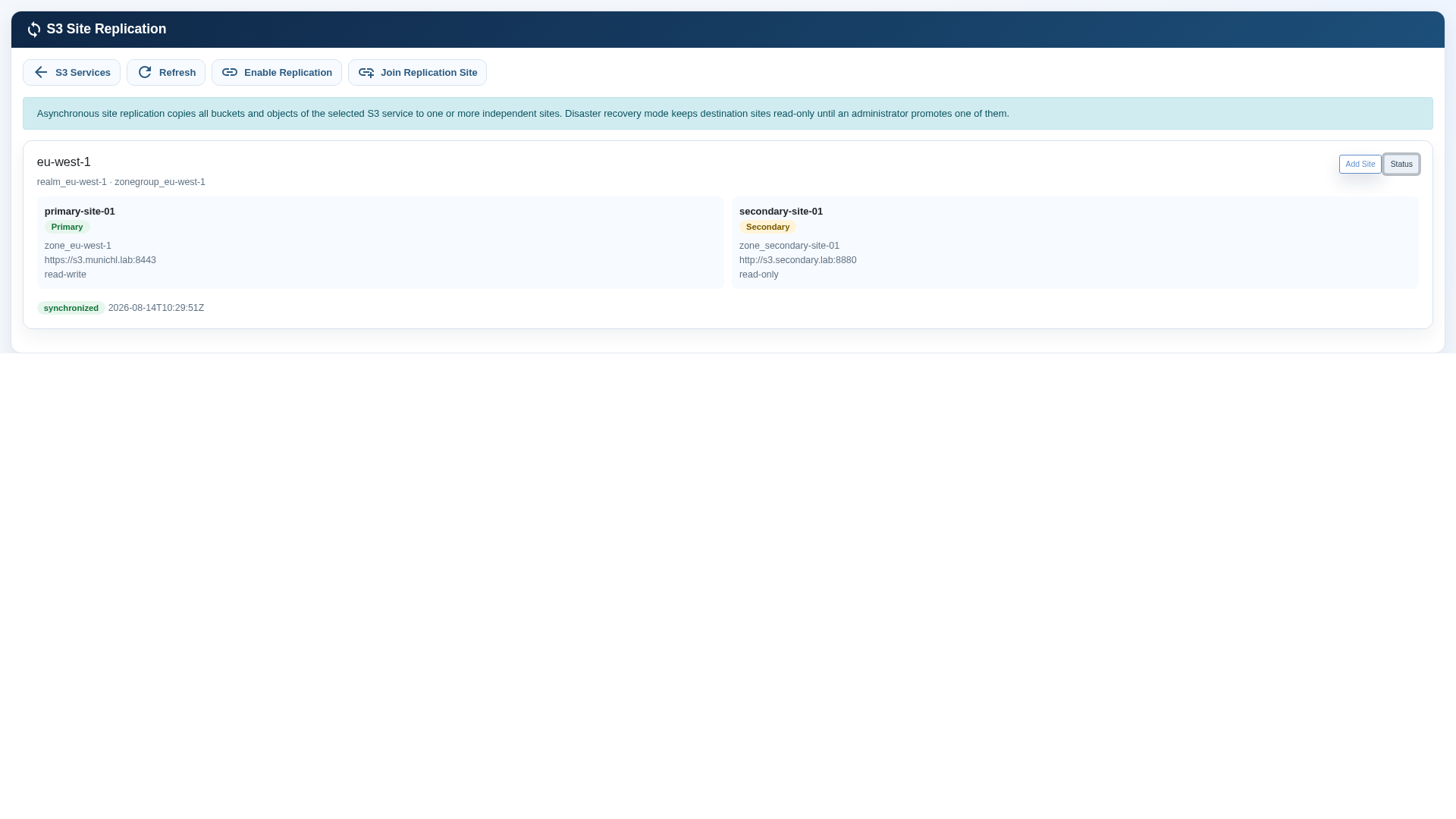
Return to the Site Replication overview and select Status. Confirm that both sites are present, the intended site is Primary, the destination is Secondary and read-only, and the relationship reports synchronized.
- Verify both clusters report healthy storage and all intended S3 gateway instances are running.
- Upload a small non-sensitive test object at the primary site.
- Read the object through the destination endpoint.
- In disaster recovery mode, confirm that a write to the destination is rejected.
- Delete the test object at the primary and confirm that the deletion is transferred.
Routine monitoring
| Check | Expected state | Action when different |
|---|---|---|
| Relationship | synchronized | Check WAN connectivity, DNS, certificates and cluster health. |
| Primary site | read-write | Investigate unexpected role changes before allowing client writes. |
| DR secondary | read-only | Stop application writes and investigate if the site is unexpectedly writable. |
| Gateways | All planned instances running | Review cluster service health and the affected node. |
| Capacity | Sufficient free space | Expand storage before the cluster reaches operational thresholds. |
| Certificate | Valid for the full monitoring period | Renew before expiry on every published endpoint. |
Local gateway failover
An IP Group protects the S3 endpoint inside each site. If the active gateway or its local service fails, the cluster moves the service address to the next eligible node. Clients should reconnect using the same DNS name and service address. Client timeout and retry policy influence the visible interruption.
- Do not create separate application credentials for each local gateway; the gateways serve the same S3 service.
- Monitor the serving node and gateway health after maintenance or failover.
- Test local failover separately from site disaster recovery.
Site outage procedure
A site promotion is a controlled disaster-recovery decision, not an automatic response to temporary loss of connectivity.
- Confirm the primary site cannot continue serving writes. Exclude a network partition or isolated management-path failure.
- Record the last known replication state and business approval for the recovery action.
- Verify the destination cluster, storage, gateways, endpoint and capacity are healthy.
- Use the approved promotion control for the local secondary site. If the GUI does not present a promotion control, stop and update to a software release that provides the approved workflow or contact euroNAS support; do not improvise a second write site.
- Redirect application DNS or load-balancer traffic only after the promoted endpoint is confirmed writable.
- Before returning service to the original site, follow a planned resynchronization and role-reversal procedure. Never permit uncontrolled writes at both sites in disaster recovery mode.
Common issues
| GUI observation | Likely cause | Safe response |
|---|---|---|
| No destination service is listed | No empty S3 service exists, or the service contains a bucket. | Create a new empty destination S3 service and refresh the page. |
| Invitation cannot be redeemed | Token expired/used, port 18443 blocked, address incorrect or certificate trust failed. | Create a new invitation; verify management reachability and certificate identity. |
| Status is behind or syncing | WAN interruption, backlog or insufficient throughput. | Restore connectivity, verify free capacity and allow the backlog to drain. |
| Status is error | Endpoint, DNS, certificate, gateway or cluster-health problem. | Check both cluster dashboards and endpoint reachability before retrying. |
| Destination write succeeds in DR mode | Unexpected role or mode change. | Stop application writes and verify the topology immediately. |
| S3 address does not answer after node failure | IP Group or gateway health issue. | Check the IP Group serving node and cluster resource health. |
Policy, credentials and planned recovery
Primary-only controls are deliberately hidden at a secondary site. Use the primary relationship view to choose replicated buckets, schedule a pause or rotate synchronization credentials.
- Use Replication Policy to protect all buckets or an explicit selection; review it after bucket changes.
- Complete all four credential-rotation stages and wait for synchronized status before finalizing the previous key.
- Use Test Disaster Recovery to validate readiness without making the secondary writable.
- For an outage, exclude a network partition, stop original-primary writes, review lag and then use Controlled Promotion.
- After the former site returns, use Refresh Topology; success is reported only after stable gateways and a reachable endpoint.
Validated release behavior
Validation used two independent three-node clusters, 1,000 small objects, a 32 MB multipart object, versioning and replicated deletion. A representative new object became readable at the secondary after approximately 12 seconds. This is a laboratory observation, not a performance guarantee.
- All three gateways at each site remained active.
- Writes at the read-only secondary were rejected.
- Failover and failback preserved the single-writer role.
- Unsafe promotion, destructive removal and active-active without required acknowledgements were rejected.
- GUI and REST API workflows were validated after recovery.
Change management
- Take a configuration record and confirm synchronized state before maintenance.
- Perform one infrastructure change at a time and verify both sites afterward.
- Do not rename endpoint DNS records without updating and validating the complete topology.
- When changing gateway-node eligibility or an IP Group address, verify hostname resolution on all nodes.
- Renew certificates before expiry and test with a non-production client.
- Maintain an independent backup and periodically test restoration independently of replication.
Acceptance checklist
- Both clusters are healthy.
- Primary and secondary site names are correct.
- Destination mode is read-only disaster recovery unless explicitly approved otherwise.
- Relationship status is synchronized.
- Test object creation, destination read and replicated deletion succeed.
- Destination writes are rejected in DR mode.
- Local gateway failover has been tested at both sites.
- Monitoring, alerting, capacity thresholds and certificate expiry checks are enabled.
- Promotion authority, client redirection and failback steps are documented.
- Independent backups are configured and restoration has been tested.
Advanced policy, monitoring and recovery
The Replication Policy window is divided into tabs so advanced controls remain readable on lower-height displays. Use the graphical interface to configure and review every item.
- Advanced Rules: create one-way or two-way rules; select source and destination sites and buckets; optionally filter by object-key prefix or object tags; map destination ownership and storage class.
- Protection: mirror deletions, retain versioned objects, delay deletions in a scheduled external archive, or use copy-only protected archive mode. The interface validates required versioning and Object Lock before accepting those policies.
- Monitoring and Alerts: configure email, existing cluster notifications, webhooks and Prometheus metrics. Operations shows per-bucket inventory, failures, RPO history and capacity forecast.
- Backfill Existing Objects: start background reconciliation after adding or changing a rule. Open Backfill Jobs to follow progress, pause, resume or cancel safely.
- Recovery: validate readiness before promotion. Optional protected hooks, a validation URL and a DNS/load-balancer integration can be combined into an audited recovery workflow with rollback.
- External Archive: configure a neutral destination name, S3-compatible address, bucket, credentials, copy/sync mode and schedule. Credentials remain protected and are not shown again.
- Compliance Report: create downloadable PDF and CSV evidence from Operations. Reports include topology, synchronization state, policy, bucket inventory and event count.