
VM
Enterprise virtualisation
Create and manage virtual machines, migrate running workloads and control resource usage from one web interface.
eEVOS brings enterprise virtualisation, high availability, flexible storage and integrated data protection into a single hardware-independent operating environment.

Instead of operating separate tools for the hypervisor, storage layer and backup, eEVOS places the essential infrastructure functions under one operational model.
Create and manage virtual machines, migrate running workloads and control resource usage from one web interface.
Monitor hosts and restart affected VMs on healthy nodes when infrastructure components fail.
Use local, mirrored, shared or Ceph-based storage according to availability, scale and performance requirements.
Protect workloads with rapid full-VM and file-level recovery, immutable recovery images, NAS or S3 backup and off-site disaster recovery.
eEVOS does not force every environment into the same storage design. The platform can be aligned with budget, availability objectives and future growth.
A compact platform for independent workloads, laboratories, branch offices or edge environments where operational simplicity matters most.
Two servers synchronously mirror storage and provide a practical entry point for highly available virtualisation with seamless failover and no separate storage array.
Connect eEVOS hosts to enterprise storage over NVMe-oF, iSCSI or Fibre Channel when centralised block storage is preferred.
Combine compute and scale-out storage across multiple hosts for distributed resilience and incremental growth.
Import assistants reduce the manual work involved in moving existing virtual machines to eEVOS.
The right decision depends on application compatibility, operational experience, licensing strategy and the desired level of infrastructure consolidation.
Use euroNAS Premium, HA Cluster or eEKAS to provide file or block storage for an existing VMware environment, subject to the selected architecture and protocol requirements.
Consolidate virtualisation, storage and backup on eEVOS and use the migration tools to bring workloads across in controlled stages.
Latency, capacity, resilience, operational complexity and scale all affect the correct storage model. eEVOS supports several approaches so the design can follow the requirement.
Direct host storage for simple deployments and workloads that do not require clustered data availability.
Synchronous mirrored storage between two hosts for compact high-availability environments and seamless failover.
Enterprise storage connected through NVMe-oF, iSCSI or Fibre Channel, with multipath designs where required.
Distributed storage across cluster hosts for resilience, horizontal expansion and hyperconverged operation.
Protocol and topology suitability must be validated against server, adapter, switch and workload requirements.
eEVOS combines multiple protection methods within the virtualisation platform: instant recovery images, file-level recovery, independent NAS or S3 backup and remote disaster recovery. Each layer addresses a different failure scenario without adding a separate operational silo.
Business workloads remain under the same management model as compute, storage and networking.
Frequent, immutable recovery images support rapid full-VM rollback as well as individual file recovery. VSS can be used for application-consistent protection of supported Windows workloads.
Separate backup targets and off-site replication extend protection beyond the production cluster and support disaster-recovery planning.
One recovery strategy, multiple layers: instant local recovery shortens operational downtime; independent NAS, S3 or remote copies address wider failure and disaster scenarios.
The current R7 interface provides a consistent operational view across cluster health, virtual machines, migration and software-defined networking.
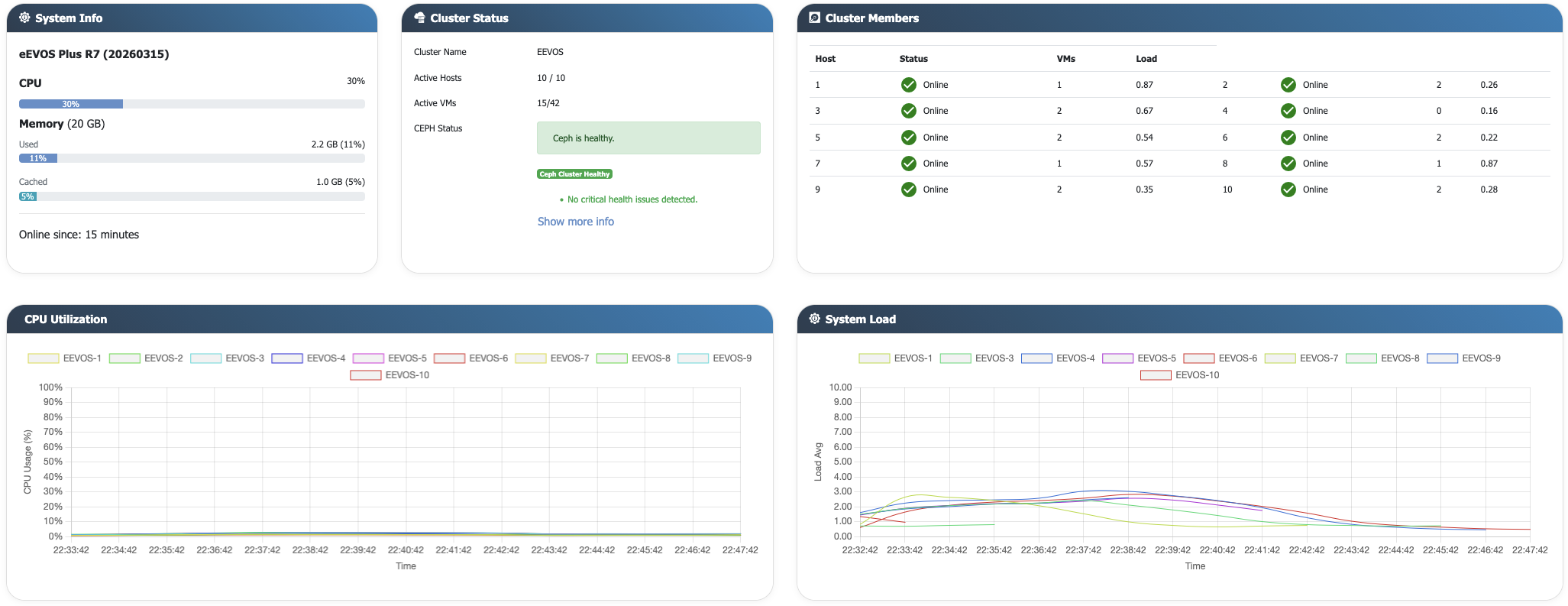
Health, resource utilisation, active VMs and Ceph status across a ten-node environment.
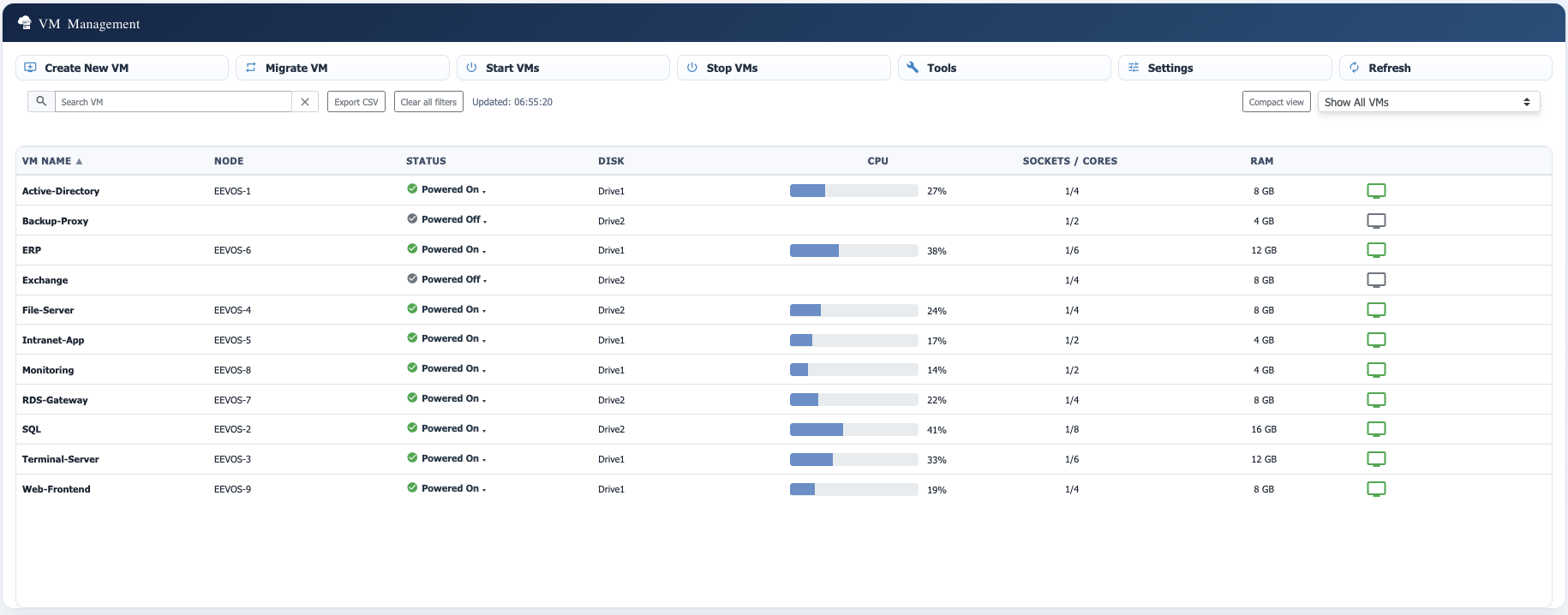
VM status, placement and resource allocation with direct access to operational actions.
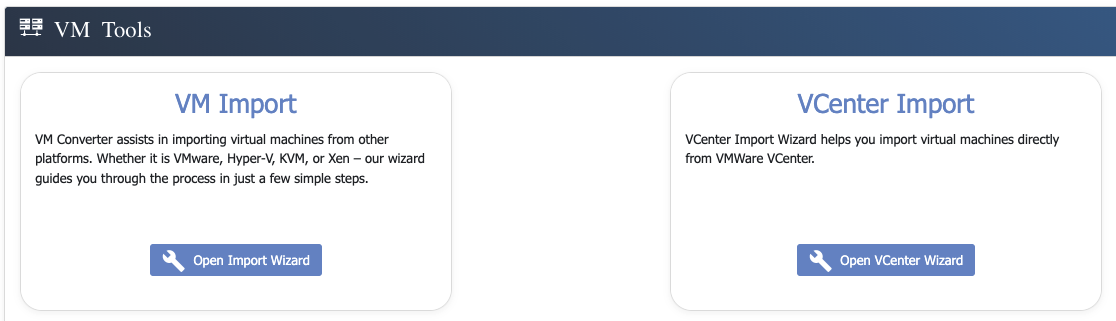
Import virtual machines from common hypervisors or connect directly to VMware vCenter.
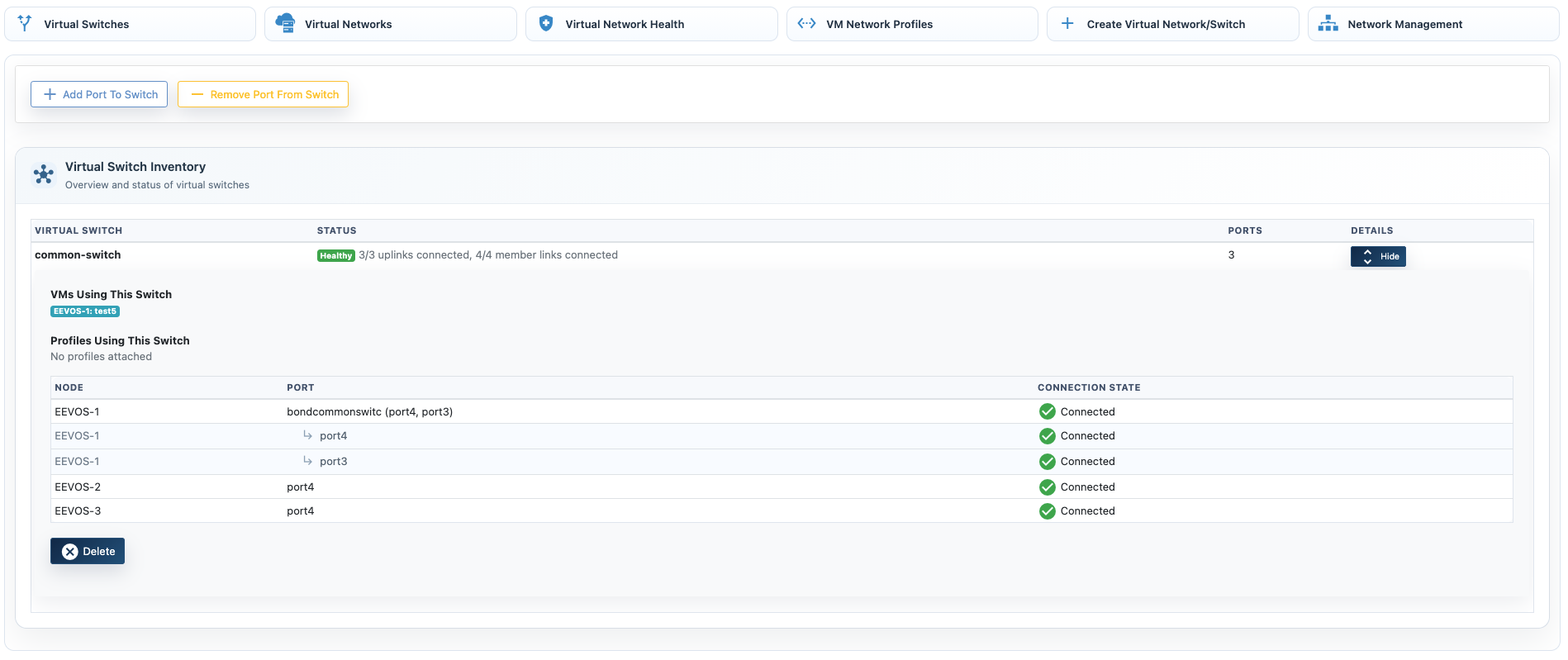
Manage virtual switches, networks, profiles and host connections through one workflow.
Move running virtual machines and rebalance workloads while services remain available.
Organise virtual networks and host connectivity centrally within the platform.
Create recovery points and independent VM copies for protection, testing and rollout workflows.
Send protected VM data to network storage or S3-compatible destinations for separation from production.
Create immutable recovery images, restore complete virtual machines rapidly and recover individual files when a full rollback is unnecessary.
Replicate workloads to a remote eEVOS environment and define controlled recovery procedures.
We can review workload dependencies, migration constraints and recovery objectives and map them to an appropriate eEVOS or VMware storage architecture.