TheUpdated screenshots8 illustrateOctober 2026, based on the current evaluated interface. Screenshots show the English userinterface interface.in Namesan evaluation installation; replace example names and addresses shownwith areyour examples;own.
use
Choose the valuesprotection definedmethod
for
yourenvironment.
Method
Purpose
Purpose
eEKAS to eEKAS sync
Asynchronous native site replication: read-only disaster recovery or active-active object writes.
Mirror current objects
One-way current-object copy to another S3 instance. No checkpoint-based restore.
Backup and audiencearchive
This
Retained guide is for systemgenerations and storagepublished administratorsrecovery whocheckpoints, configurewith asynchronous S3 replication between independent eEKAS clusters. All procedures use the euroNAS graphical interface; no command-line access is required.
Completepreview and recordrestore.
a
recoveryplan
before enabling production replication.
Site replication copiespropagates changes;changes itand does not replace an independent backup.
Terminology
Term
Meaning
Primary site
The currentmetadata authoritativeprimary writeowns site.
administrative
metadata;
it
Secondaryis site
not
Anecessarily remotethe only site receivingaccepting asynchronousobject changes.
writes.
S3 service
The configured object-storage service, endpointsynchronization and backingrecovery: Cephnative storage.
sites,
external
IP Group
Service addressesprotection and orderedlocal eligibleincoming gatewaystate.
nodesat
1. onePrerequisites cluster.
and
preparation
Disaster
Use recoveryhealthy mode
independent
Secondary site remains read-only until controlled promotion.
Active-active mode
Writes are allowed at more than one site; use onlyclusters with compatible applications.
Invitation
Short-lived trust package used once to join a destination site.
Prerequisites
Two healthy, independentaccepted eEKAS clusters.versions. Plan capacity for replicas, retained versions and catch-up.
A configured and reachable S3 service at the primary site.
A configured but empty S3 service at the destination site.
Adequate destination capacity and an appropriate Ceph protection policy.
Stable DNS names for both S3 service endpoints.
HTTPS management connectivity from destination to primary on port 18443 for online invitations, or a secure method to transfer an encrypted invitation file.
S3 endpoint connectivity between sites on the configured service ports.
Synchronized time, valid certificates and working name resolution on every gateway node.
A documented RPO, RTO, promotion authority and client-redirection method.
Planning worksheet
Item
Primary site
Destination site
Site name
primary-site-01
secondary-site-01
S3 service
eu-west-1
empty destination service
S3 DNS name
s3.primary.example
s3.secondary.example
S3 service port
443 or configured port
443 or configured port
Management address
HTTPS address, port 18443
Not required for invitation redemption
IP Group
Name and gateway order
Name and gateway order
Mode
Authoritative write site
Disaster recovery by default
1. Configure the IP Group at each site
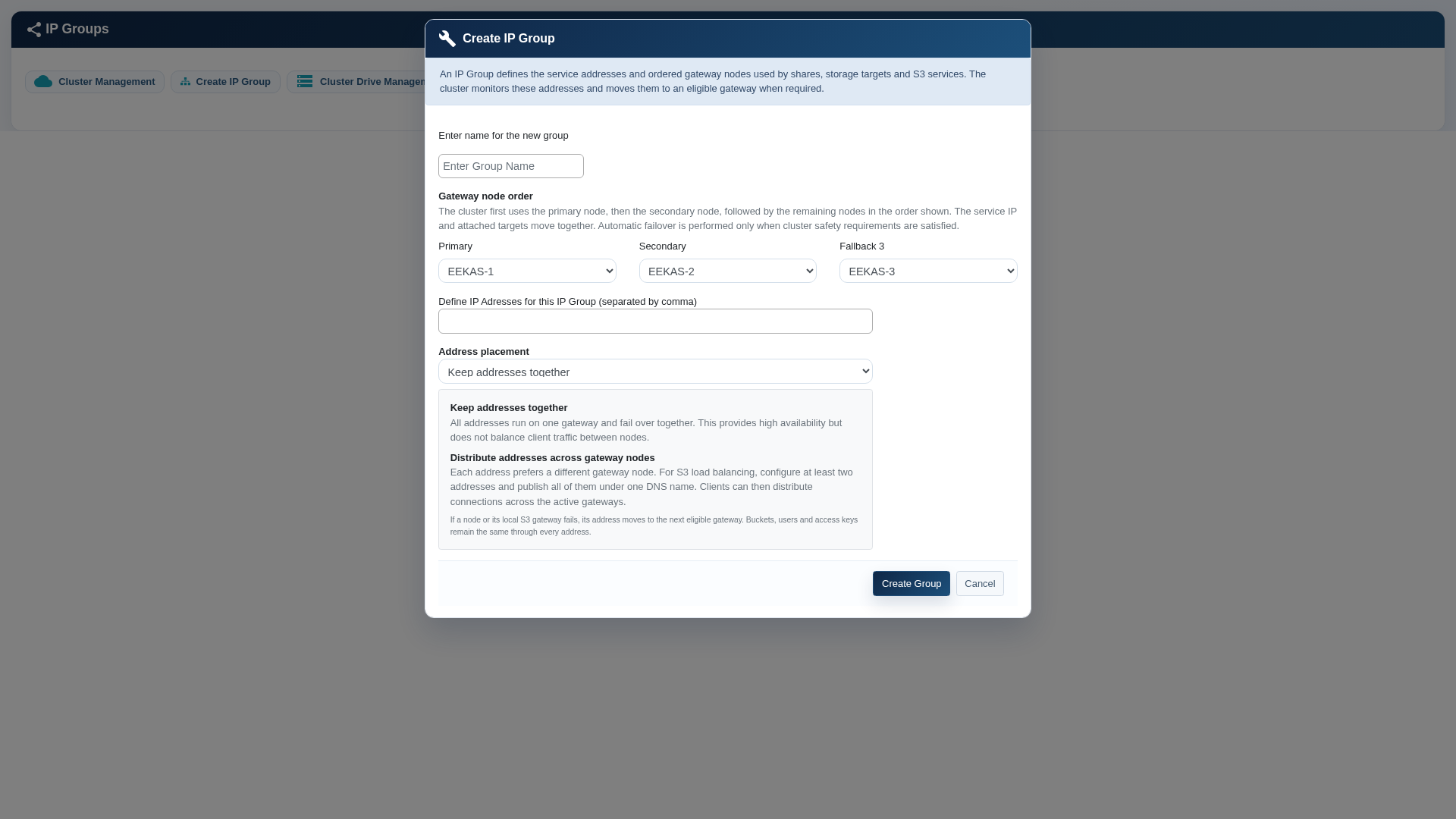
Create the IP Group and define the preferred gateway-node order.
Open Cluster Management and select Create IP Group. Define a neutral group name, the ordered gateway nodes and one or more service addresses. With one address, the service runs through one gateway at a time. Multiple distributed addresses can spread client connections when all addresses are published under one DNS name.
Place the preferred gateway first and define secondary and fallback nodes.
Select Keep addresses together for a simple active/passive service address.
Select Distribute addresses across gateway nodes only when at least two addresses and suitable DNS client distribution are available.
Verify that the address network is reachable from S3 clients.
2. Create the S3 services
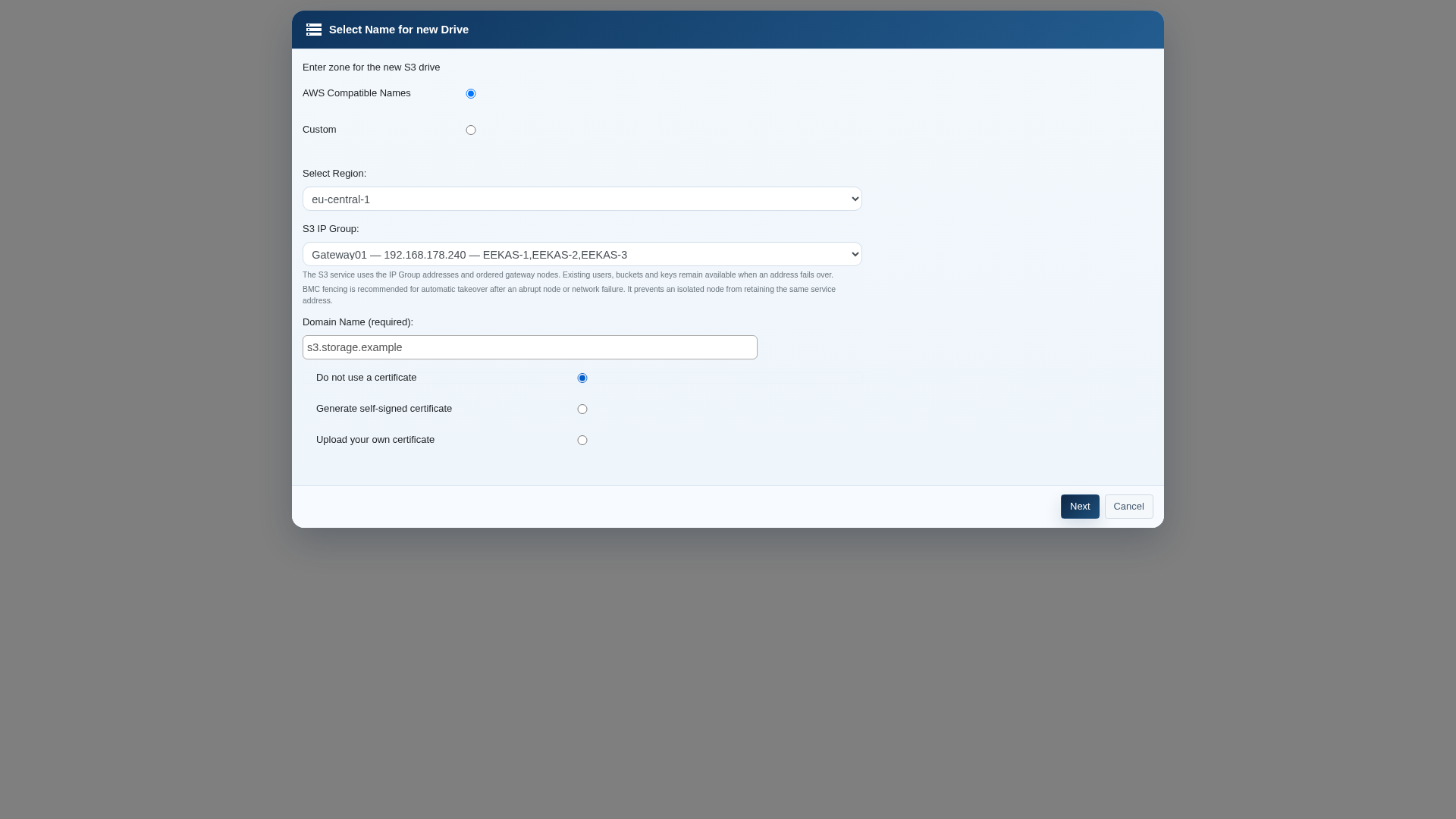
Select the IP Group, region and endpoint name while creating the S3 service.
Create the primary S3 storage service and assign its IP Group, DNS name, certificate choice and local storage. At the destination, create a separate S3 service with itslocal ownstorage, an IP GroupGroup, eligible gateway nodes, stable DNS and storage,trusted butHTTPS docertificates. Verify routing, firewalls, time synchronization and endpoint reachability.
For native joining, the destination S3 service must be empty, with no buckets. Joining adopts that service; it does not createmerge bucketspopulated ornamespaces.
upload
For objects.online Onlyinvitations, enable the source REST API and allow the destination to reach the source management HTTPS listener, normally port 18443.
Record versioning, Object Lock, retention, legal holds, permissions and SMB gateway configuration. Define recovery authority, fencing, client routing, RPO and RTO.
For archive jobs, ensure the chosen worker node has source/archive connectivity and enough staging disk.
Keep certificate verification enabled. Configure private CA trust where needed; accepting an emptyuntrusted destinationcertificate serviceis canan beexplicit adoptedexception byfor controlled private systems.
2. Configure native eEKAS replication
Set up the replicationsource topology.installation
Open
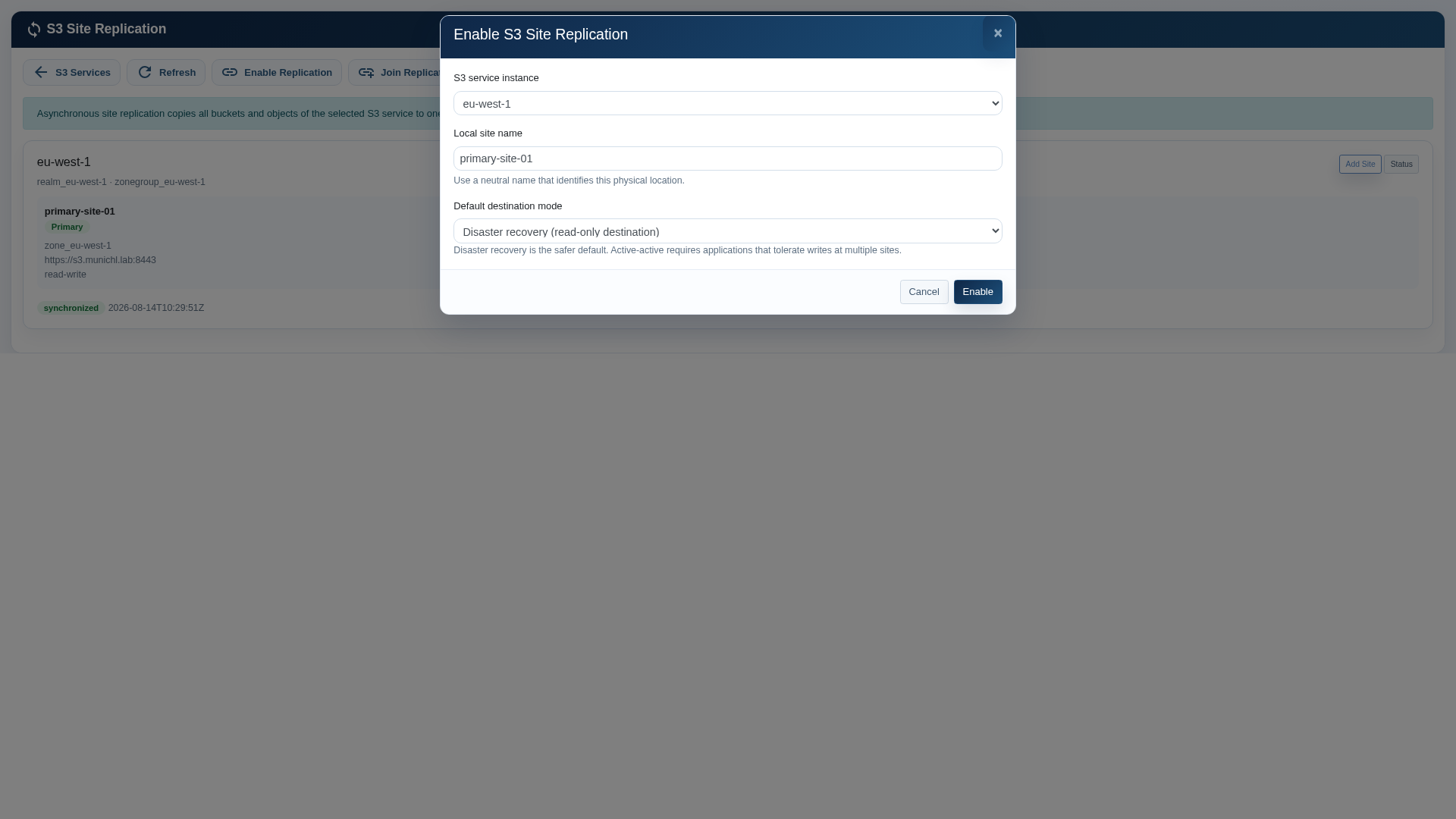
3.S3 Enable replication at the primary site
Enable replication on the primary sitesynchronization and selectrecovery the→ appropriateeEKAS destinationto mode.eEKAS sync
Open→ S3Set Console,up choosesource Site Replication and select Enable Replication.
installation.
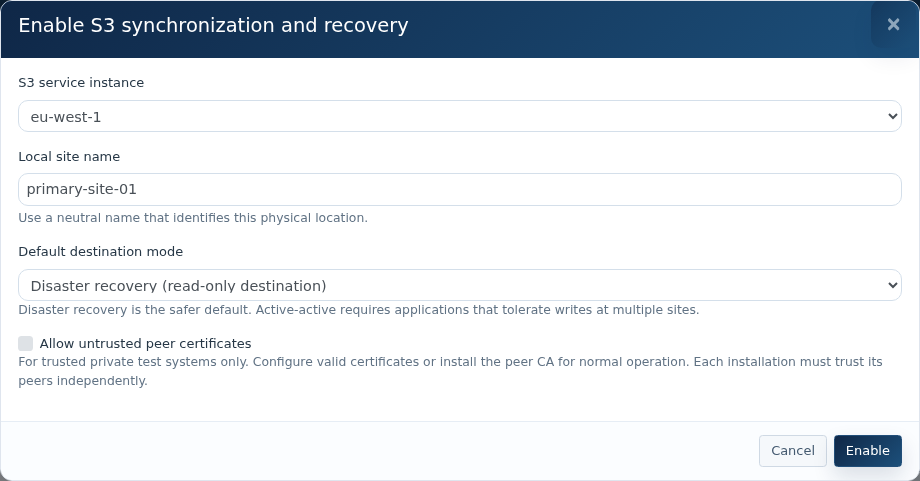
Select the source S3 service instanceand to protect.
Enterenter a neutral physical site name, for example primary-site-01.name.
Select Disaster recovery unless(read-only thedestination), applicationor hasActive-active been(writes validatedallowed forat every site) only when applications tolerate concurrent multi-siteasynchronous writes.
SelectKeep peer certificate verification enabled. Choose Enable and wait for the relationshiprelationship. toActive-active appear.requires acknowledgment of write conflicts.
Source
4.service, site name, destination mode and certificate verification.
Create a destinationone-time invitation
Create
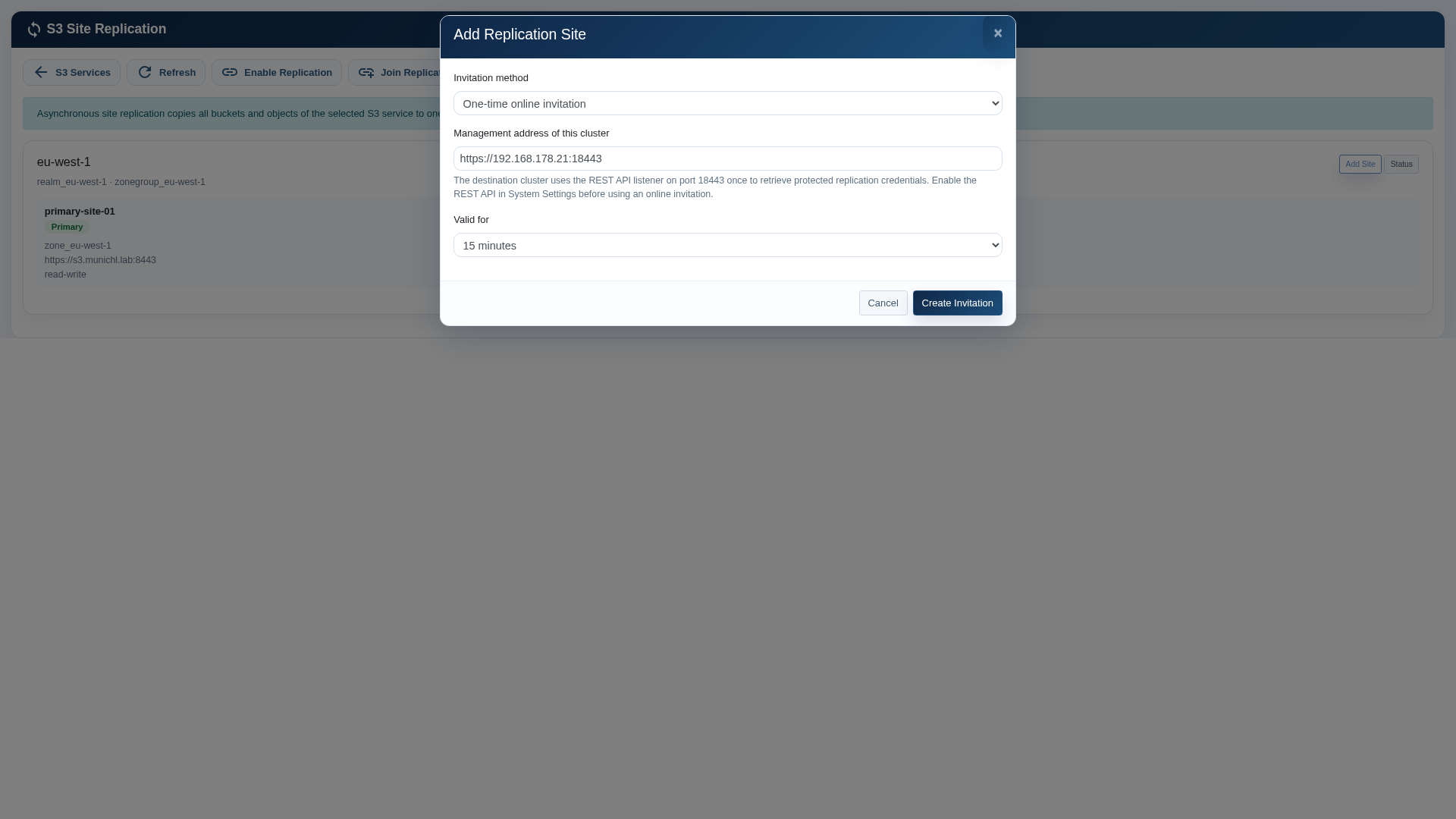
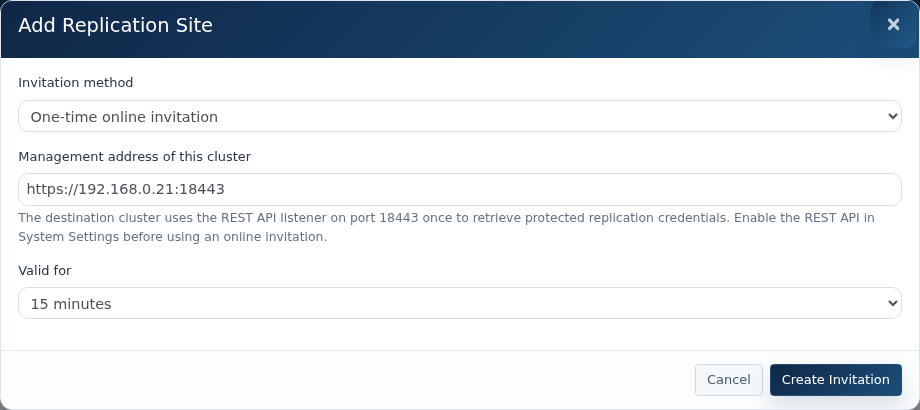
On the source relationship choose Add Site and a short-livedone-time invitationonline andinvitation.
provide
Set the source management address ofreachable from the primarydestination, cluster.
On the primary relationship, select Add Site. For normal connected deployments, choose One-time online invitation.
Confirm the primary management address andnormally HTTPS port 18443.
Choose 15 minutes, 60 minutes or 24 hours validity. Create the shortest practical invitation lifetime.
Select Create Invitation and securelytransfer copy the one-timeits token and displayed management address.securely.
Use the token before expiry. Review Invitations and revoke unused valid tokens.
The encrypted invitation-file methodoption whenrequires a passphrase of at least 12 characters. Transfer file and passphrase separately. The current destination web form accepts an online address and token; arrange the supported administrative import procedure before choosing the file method.
Online invitation with a limited lifetime.
Join an empty destination
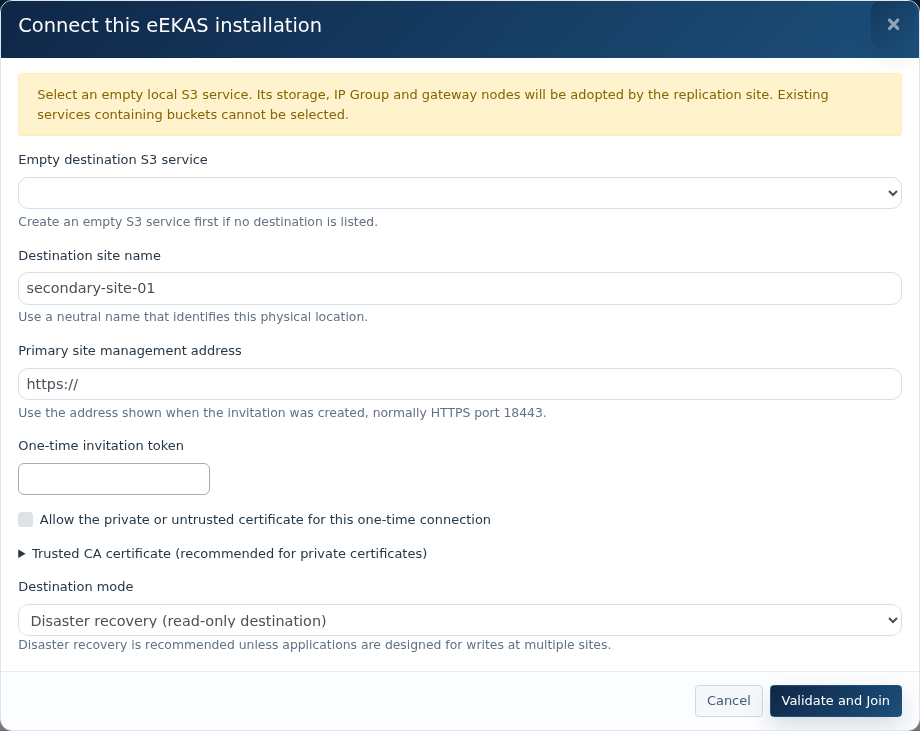
At the destination cannotopen reacheEKAS theto primaryeEKAS managementsync listener.→ TransferConnect thethis file and its passphrase through separate secure channels.installation.
5. Join the destination site
Select an empty destinationlocal S3 service, enter the invitation dataservice and validatea theunique connection.
site name.
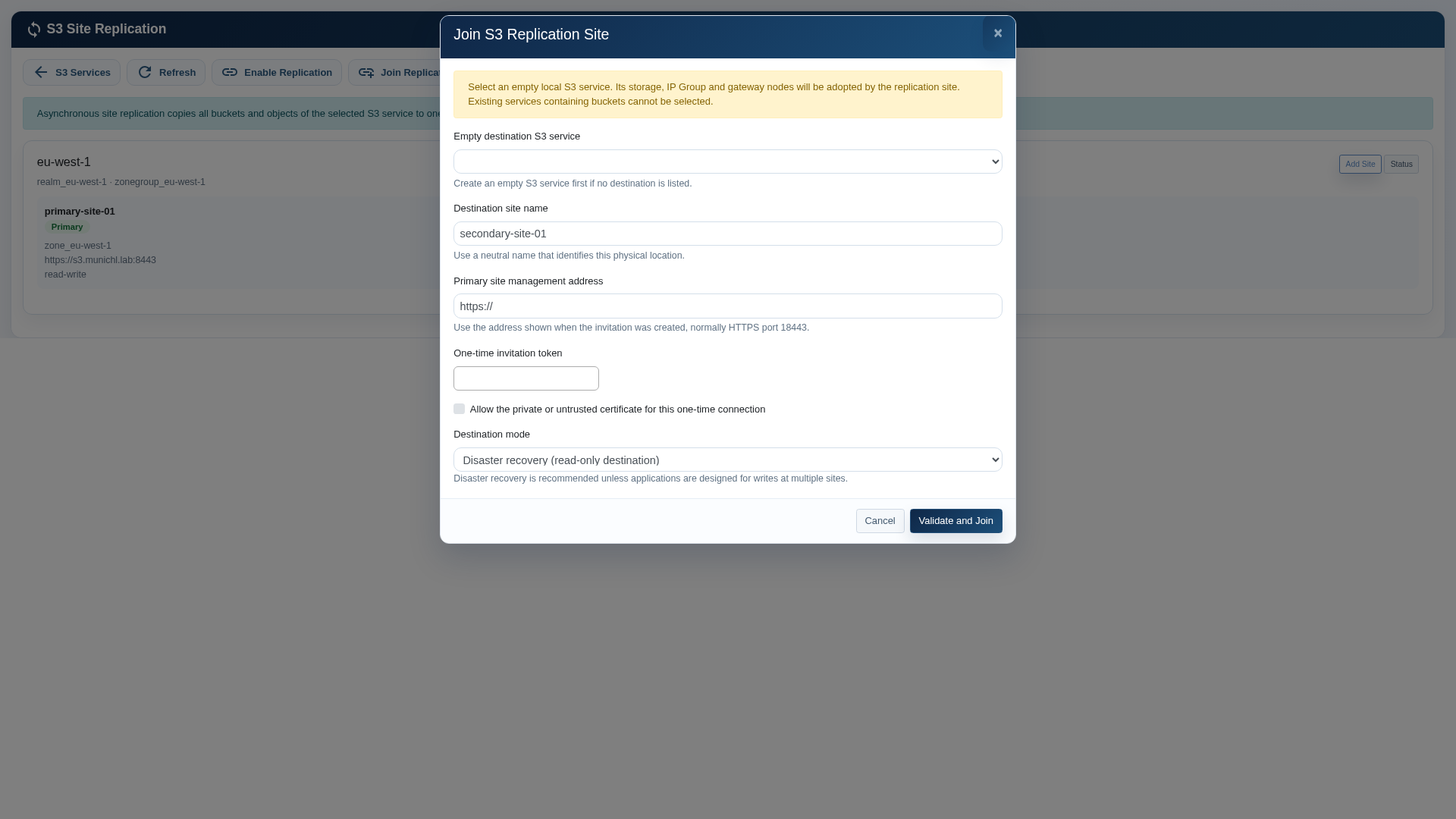
Sign in to the destination cluster, open S3 Console, choose Site Replication and select Join Replication Site.
The screenshot was captured after the laboratory destination had already joined, so the empty-service list is blank. During first-time configuration it lists only eligible empty S3 services.
Select the empty destination S3 service. ItsLocal storage, IP Group, listener portGroup and gateway-nodegateway selectionnodes willare beused adopted.
by
Enterthe a neutral destination site name.replica.
Enter the primarysource management address and one-time invitationtoken. token.Configure trusted CA information where applicable.
Select Allow the private or untrusted certificate only for a controlled laboratory or private-certificate bootstrap where the certificate has been independently verified.
Keep Disaster recovery as theintended destination modemode, unlesschoose active-active operation has been approved.
Select Validate and Join.Join, Doreview the endpoint and acknowledge adoption of the empty service.
Wait for setup and initial synchronization. Check both installations and read test objects through their actual S3 endpoints. In DR mode, verify destination writes are rejected.
Destination join form; this evaluation has no unused empty service available.
If joining fails, inspect the returned error and Event Log. Partially completed setup may need administrator cleanup; do not closedelete replica pools or retained original storage to fix a naming error.
3. Policies and daily operation
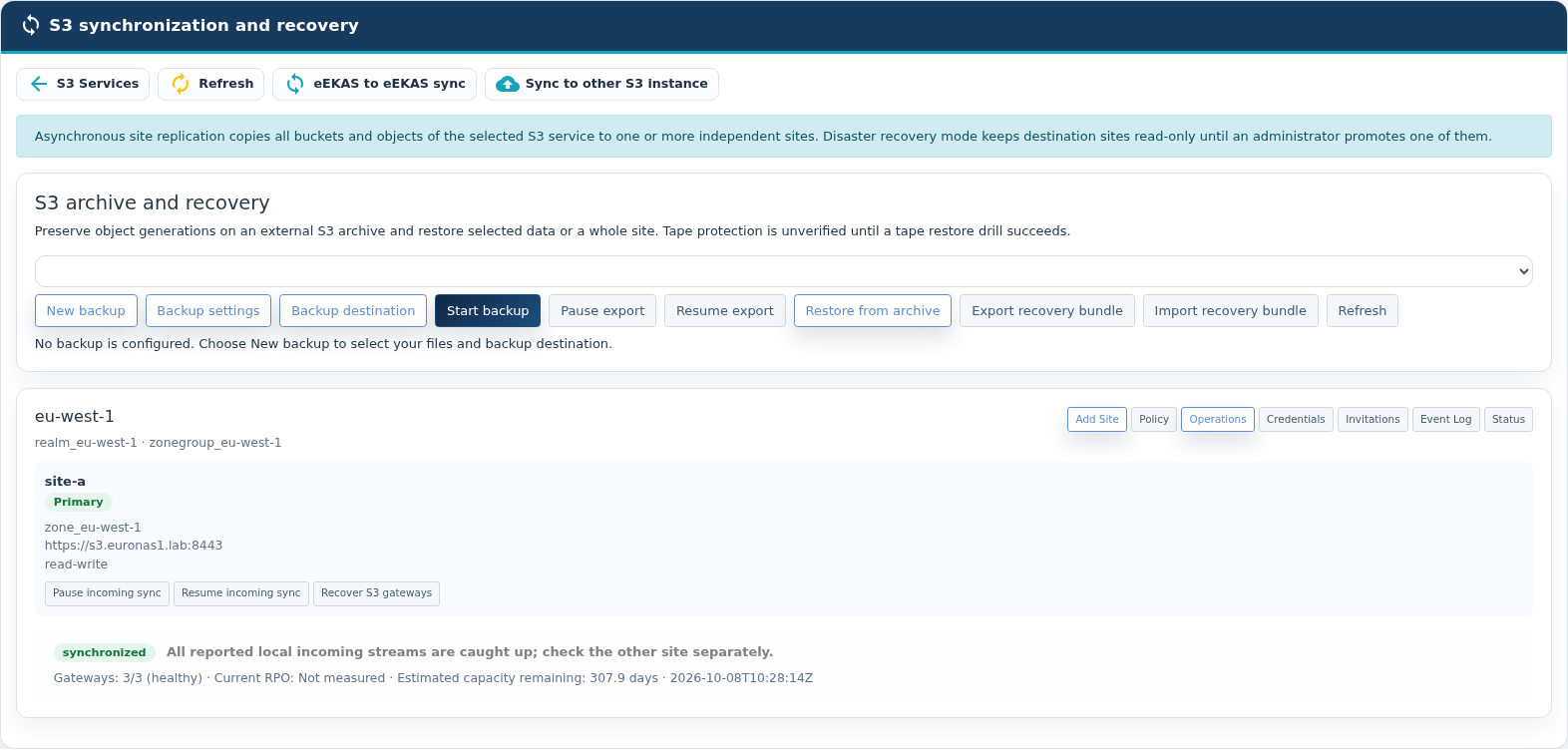
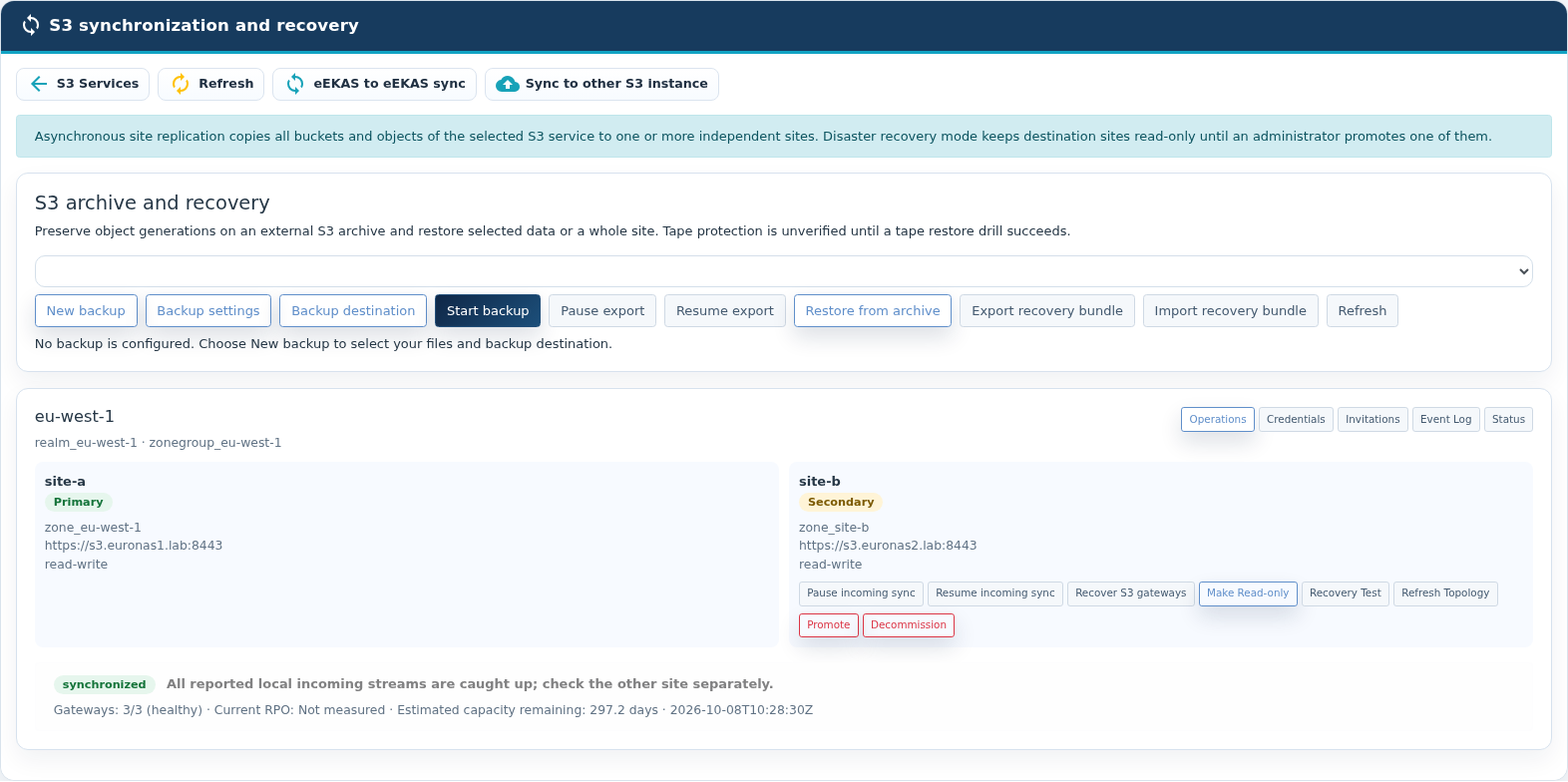
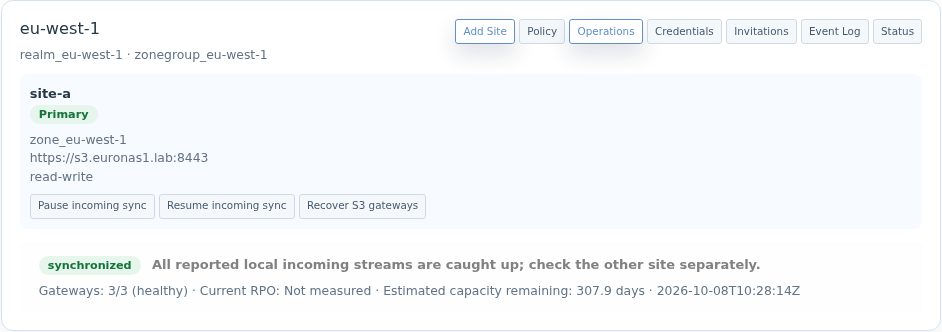
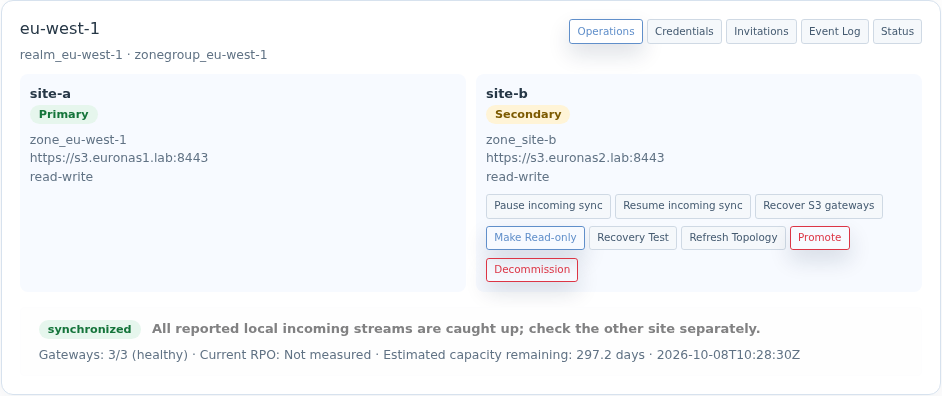
Metadata-primary overview in the pageevaluation deployment.Secondary overview of the same namespace. Administrative controls differ by role.
The evaluated source view lists its local card, while the destination gatewayview is being deployed.
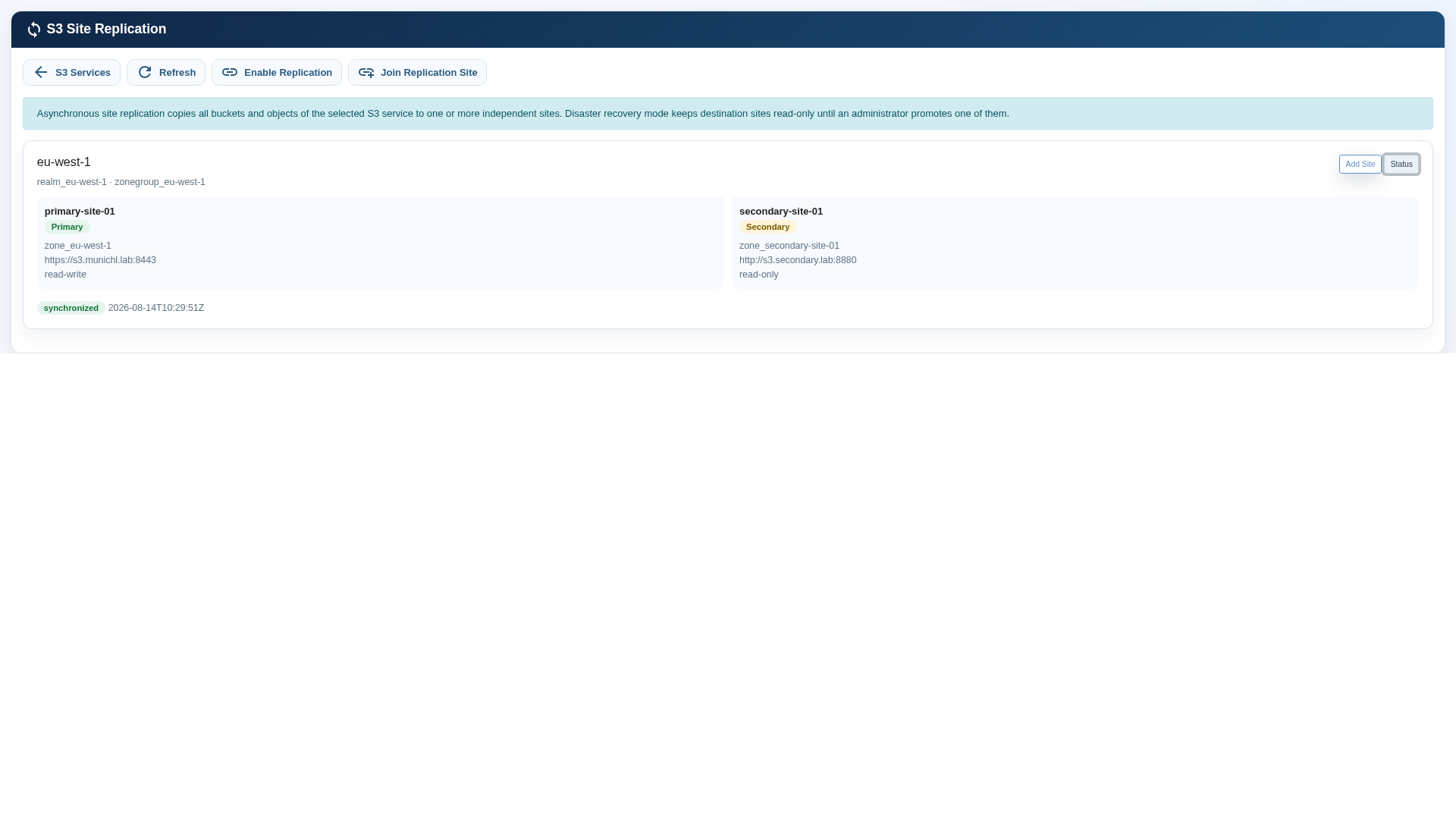
6. Verify synchronization
Verify thatlists both sitessites. areCard showncount and the relationship reports synchronized.
Return to the Site Replication overview and select Status. Confirm that both sites are present, the intended site is Primary, the destination is Primary/Secondary andlabels read-only,do andnot theprove relationshipremote reportshealth. synchronized.
Verify both clusters report healthy storage and all intended S3 gateway instances are running.
Upload a small non-sensitive test object at the primary site.
Read the objectseparate throughsynchronization thestate destinationand endpoint.
gateway
In disaster recovery mode, confirm that a write to the destination is rejected.
Delete the test objectcount at theevery primary and confirm that the deletion is transferred.
Routine monitoring
site.
Check
Expected state
Action when different
Control
Meaning
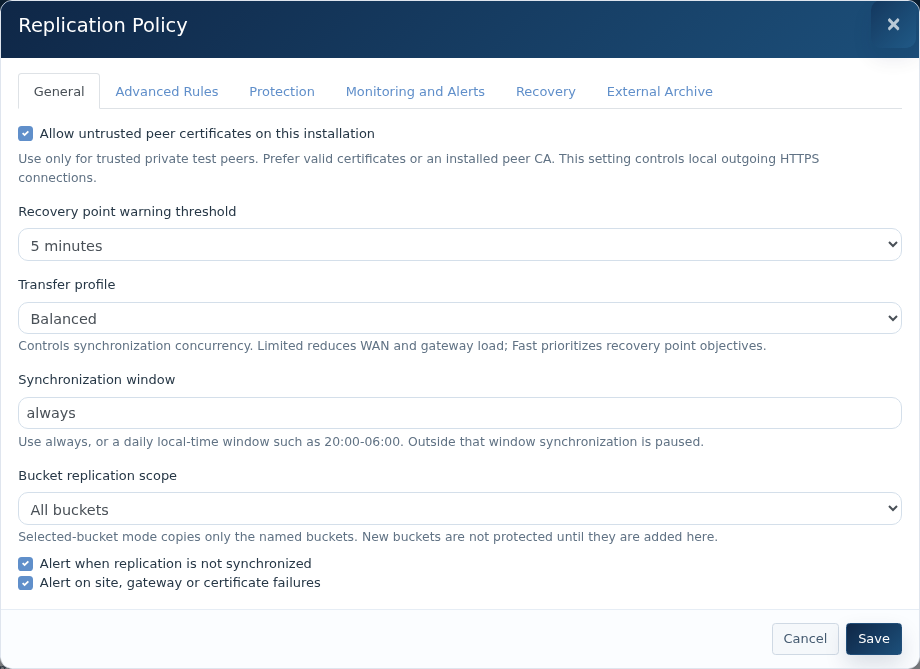
RelationshipRecovery point warning threshold
synchronized
5,
Check15 WANor connectivity,60 DNS,minutes, certificatesor and24 clusterhours: health.a warning objective, not synchronous writes or a guaranteed RPO. Durability RPO remains unmeasured.
PrimaryTransfer siteprofile
read-write
Limited,
InvestigateBalanced unexpectedor roleFast changes beforeconcurrency; allowingit clientis writes.not a hard bandwidth limit.
DRSynchronization secondarywindow
read-only
Always,
Stopor applicationa writesdaily local-time window such as 20:00–06:00. Incoming synchronization pauses outside the window and investigatelag ifcan the site is unexpectedly writable.grow.
GatewaysBucket replication scope
All plannedbuckets, instancesor running
Selected
Reviewbuckets clusterseparated serviceby healthsemicolons. Unlisted and thenew affectedbuckets node.are excluded until added.
CapacityAdvanced Rules
SufficientBucket, freekey-prefix space
and
Expandtag storagefilters; beforedestination bucket, owner and storage-class mappings; one-way/two-way direction. These replace the clustersimple reachesscope: operationaltest thresholds.routing.
CertificateProtection
ValidReview fordeletion handling, versioning and Object Lock. Retaining previous versions depends on versioning; external copy/deletion-delay settings affect the fullexternal monitoringtransfer periodpath.
Monitoring and Alerts
RenewEmail, beforeexisting expirySNMP onnotifications, everywebhook publishedstate endpoint.changes or Prometheus metrics. Test notification delivery.
Recovery
Validation, secure administrator-provided recovery hooks and optional global endpoint integration. Manual routing changes still require an administrator.
External Archive
Scheduled current-object copy/mirror. Generation-preserving backup is configured separately under S3 archive and recovery.
General
Localpolicy: trust, warning objective, transfer profile, window and bucket scope.
Interpret status correctly
Synchronized means reported local incoming streams are caught up. It does not certify the opposite direction, zero data loss or physical-media backup. Check both sites. Syncing/behind requires follow-up, error indicates a problem, and unknown is insufficient evidence.
Site A: incoming synchronization and gateway failoverhealth; recovery point remains unmeasured.Site B: check this incoming direction separately.
Use Refresh and review endpoints, modes, gateways and Event Log.
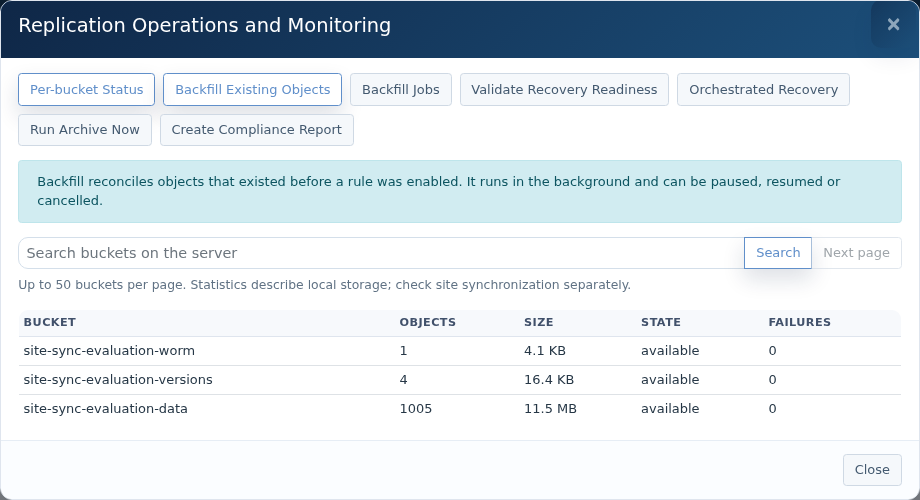
Operations offers local per-bucket statistics with Search and Next page, up to 50 entries per page. Counts do not verify the remote inventory.
Pause/Resume affects local incoming synchronization. In active-active mode, this does not pause all outgoing or remote streams.
Use Allow Writes or Make Read-only at the relevant secondary; recheck synchronization and applications.
Operations: paginated local bucket statistics.
Backfill, credentials and removal
Start Backfill Existing Objects on a destination for objects predating a replication rule. Monitor Backfill Jobs; pause, resume or cancel as needed. Treat backfill as a separate load phase and verify bytes and versions afterward.
Credential rotation: Stage Replacement at the primary → Adopt Replacement at every secondary → Activate Replacement at the primary → Finalize Rotation only after synchronization is healthy. The old key remains valid until finalization.
Removing a secondary from the primary topology is separate from decommissioning its installation. Local decommission stops gateways and removes replica configuration; data is retained unless deletion is explicitly selected and confirmed. Verify recovery alternatives first.
4. Native recovery
Recover S3 gateways
AnFor an unavailable endpoint on a running installation, check gateways, networking and IP Group protectshealth. Recover S3 gateways restarts local gateways and refreshes endpoint resources. Review the result, test a real S3 read/write and check catch-up. This does not rebuild lost storage or promote a secondary.
Promote a standby site
Identify the intended authority and latest replicated content; stop application writes during the decision where practical.
Stop or isolate the old primary and confirm fencing so it cannot resume independent authority.
Inspect surviving-site incoming synchronization, gateways and endpoint. Run Validate Recovery Readiness in Operations.
Choose Promote or configured Orchestrated Recovery, select the destination, type the displayed zone name and confirm primary isolation.
Use emergency force options only after explicitly accepting and recording possible loss of recent objects.
Update client routing manually or through tested global endpoint insideintegration. eachVerify site.bytes, Ifpermissions, WORM and application access.
Keep the activeformer gatewayprimary isolated on return. Refresh topology, reconcile and synchronize before enabling writes or arranging failback.
Recovery hooks and DNS/load-balancer integration need secure executables and tested configuration; a hostname alone does not provide automatic failover. Active-active object writes at a surviving site do not resolve metadata-primary loss. Total-primary-cluster loss and full promotion/failback were not exercised in the recorded evaluation.
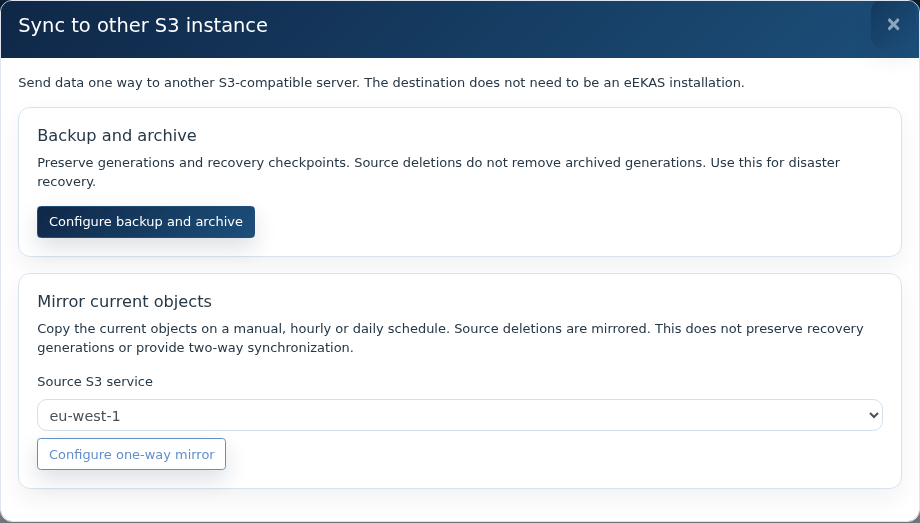
5. Mirror current objects to another S3 instance
Choose current-object mirror or backup/archive with retained recovery points.
At the metadata-primary installation choose Sync to other S3 instance → Mirror current objects, select the source service and Configure one-way mirror.
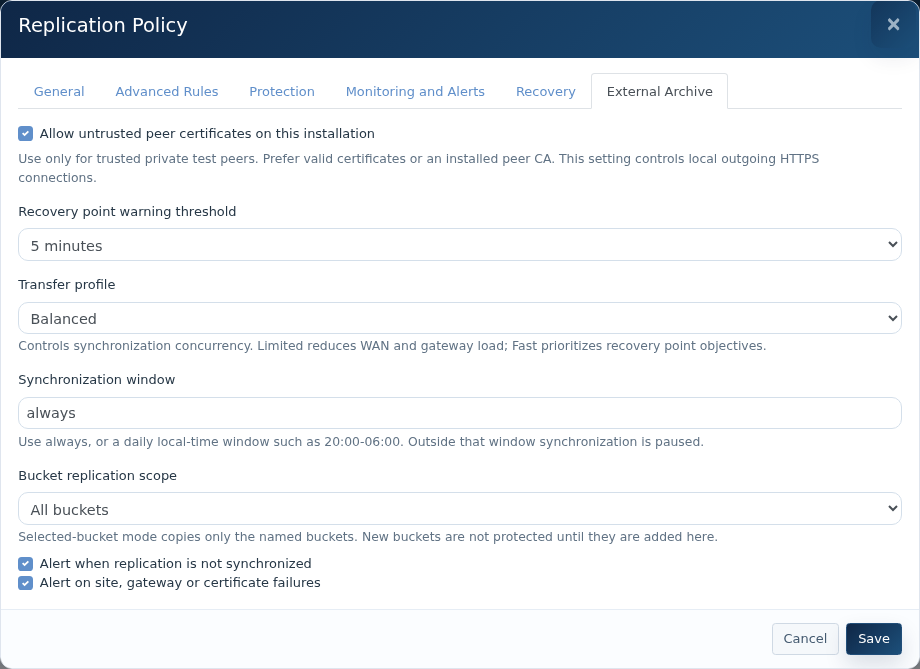
In External Archive, enable the destination and enter its name, HTTPS endpoint, existing bucket, signing region, access key and secret.
Choose Mirror for current content and source deletions, or Copy only to keep extra destination objects. Choose Manual, Hourly or Daily.
For a manual run choose Operations → Run Archive Now. Review results and Event Log; verify destination bytes and test overwrite/deletion in dedicated test buckets.
External Archive: one-way current-object transfer configuration.
Each source bucket uses a same-named prefix inside the destination bucket. There is no reverse synchronization, checkpoint preview/restore, original-version reconstruction or ownership recovery. Copy only can overwrite an existing destination key. The delayed-deletion area is not a recovery catalogue. Keep unrelated content outside managed prefixes. Qualify listing duration and worker memory for large buckets; new independent external-mirror acceptance remains outstanding.
6. Configure backup and archive
Choose Sync to other S3 instance → Configure backup and archive, or New backup under S3 archive and recovery.
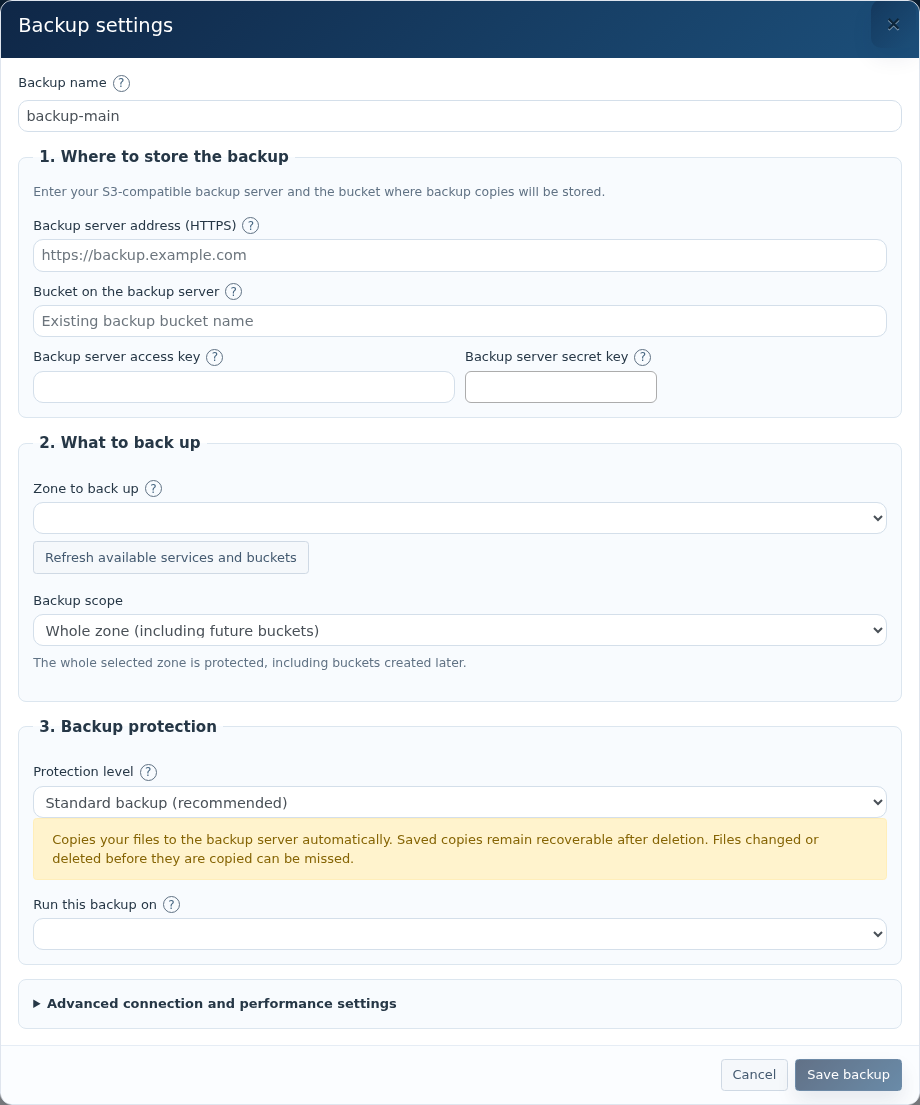
Enter a unique Backup name, external HTTPS address, existing destination bucket and access/secret keys.
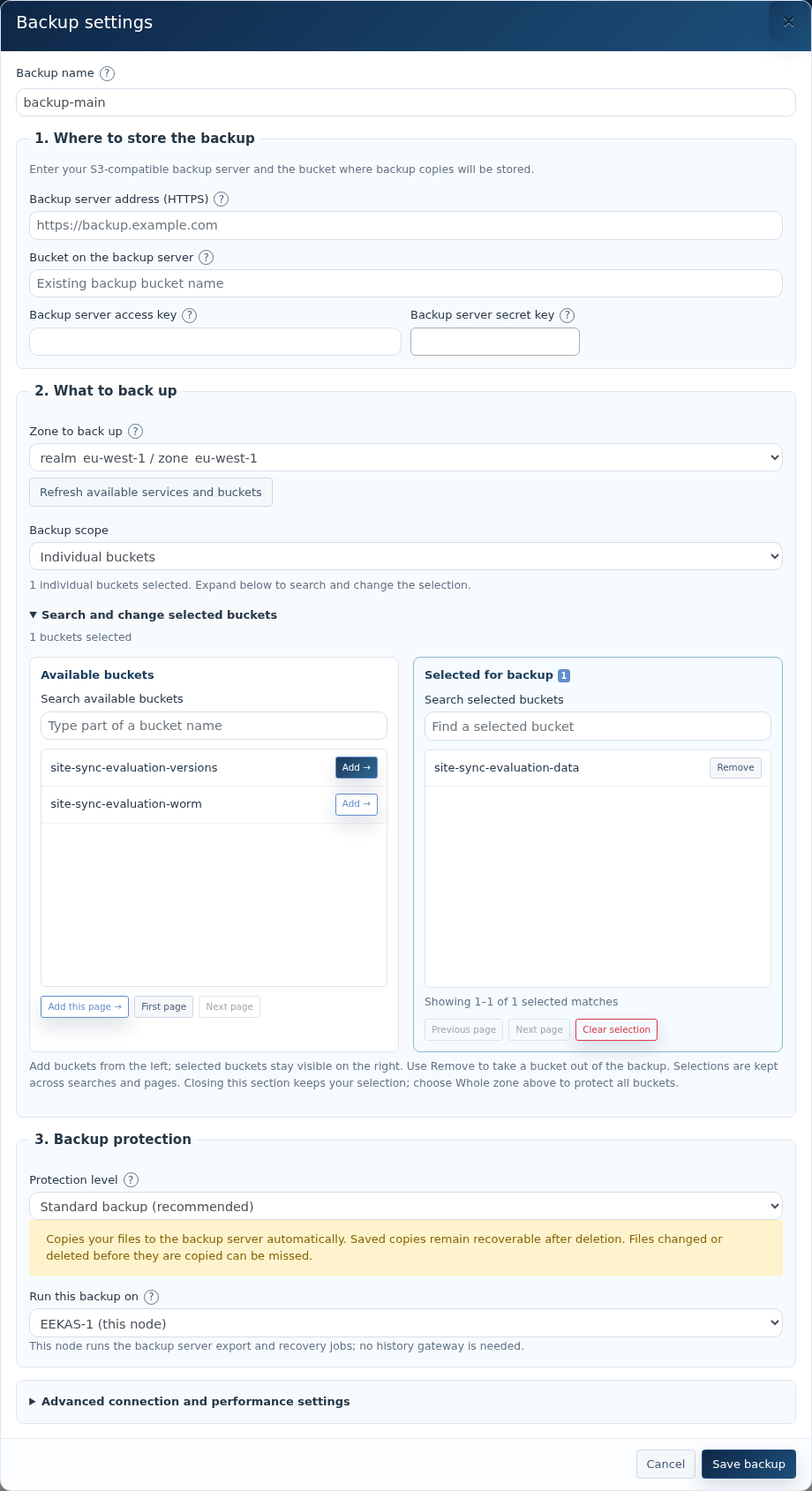
Select the source zone. Whole zone covers current and future buckets; Individual buckets opens Available buckets and Selected for backup.
Search and add buckets. Selection persists across search/pages; Add this page adds only the displayed page. Remove excludes a selection.
Choose Standard backup (recommended), or planned Extra protection for older versions.
Choose the eEKAS node under Run this backup on. Create the backup through that node’s management page; verify connectivity and staging space.
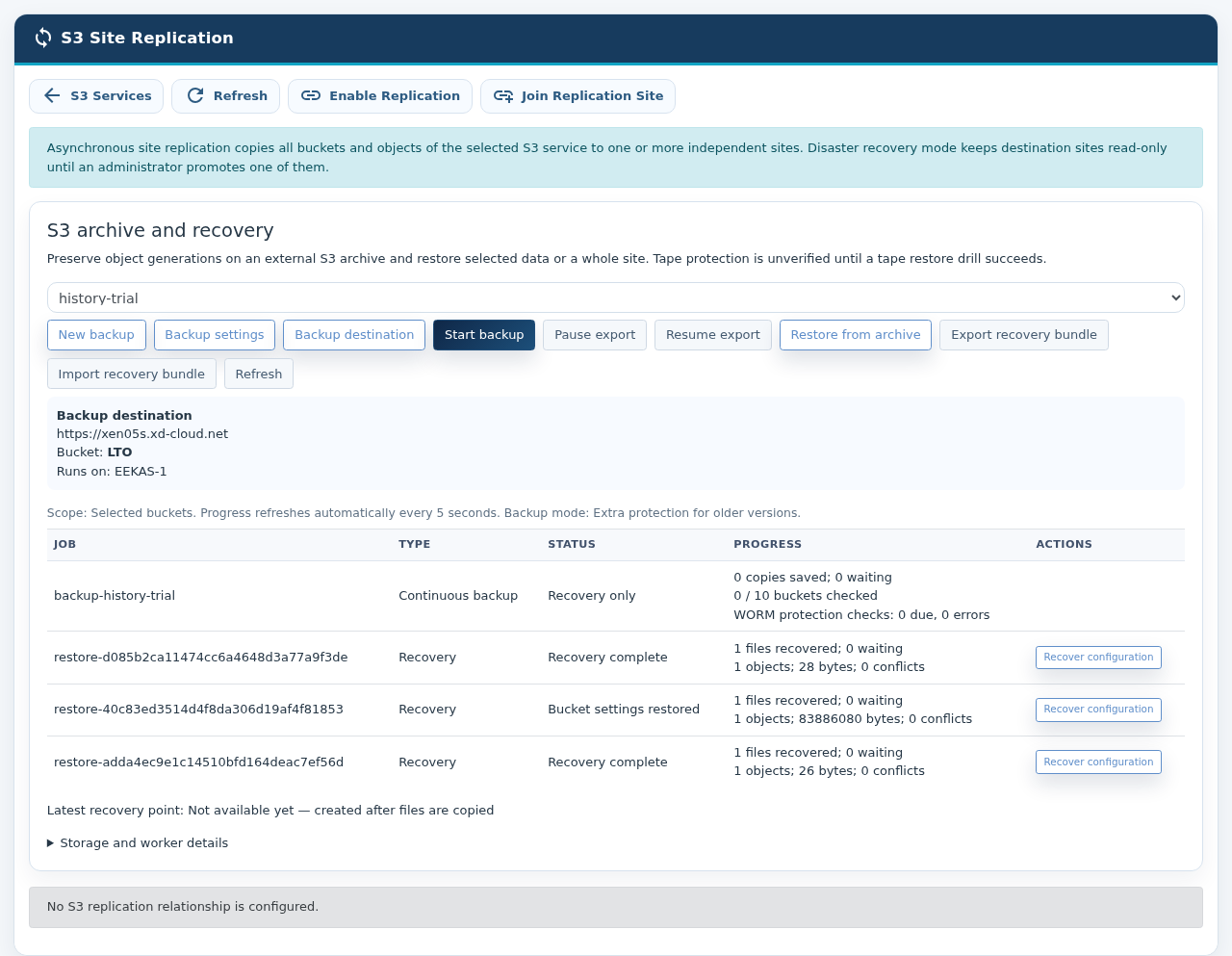
Review advanced settings, Save backup, then Start backup. Saving alone does not start export. Wait for a completed checkpoint.
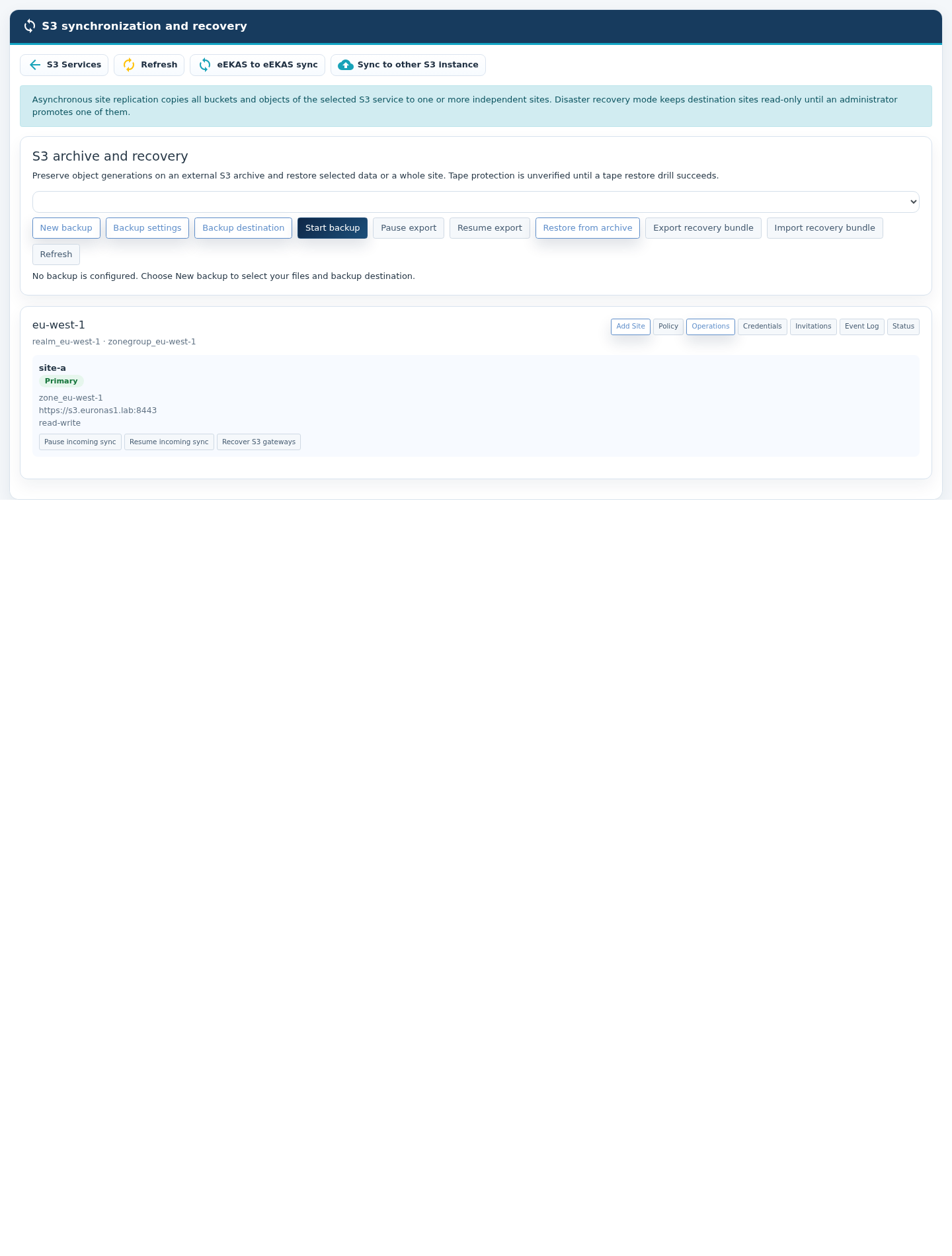
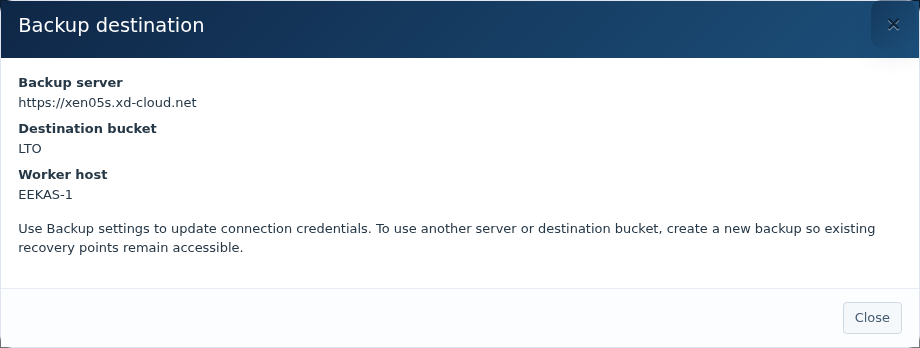
Backup destination, source scope, protection level and worker host.Searchable available and selected bucket lists.
Standard backup reads generations still available at the source; it cannot capture a version already removed before reading. Maintain source versioning and WORM. Extra protection creates a local history zone/gateway with separate unused port (for example 9443), HTTPS endpoint, certificate/private key and storage. It adds capacity needs and does not itself survive total primary-site loss.
Advanced setting
Default / use
Source service fails,details and CA
Keep discovered realm, zonegroup, zone and endpoint unless a specific change is needed. Supply the clusterprivate movesissuing CA chain where required.
Check for changes every
60 seconds; upload notifications may queue work sooner. No guaranteed export latency.
Minimum time between full recovery catalogs
3,600 seconds. Measure catalogue duration before reducing.
Parallel WORM protection checks
4; metadata checks are separate from uploads. Monitor source request load.
Recheck WORM settings after
3,600 seconds requested minimum; large queues can take longer.
Largest file to stage locally
100 GiB per object; not a total disk reservation. Provide actual workload headroom.
Backup server S3 region
Usually us-east-1; use the servicedestination addresssigning region.
Recorded backup destination summary: server, bucket and worker, without secrets.
Use Backup settings for connection settings. For changes to storage identity, protection level or bucket set, create a new backup and retain access to old recovery points.
7. Monitor export and preserve recovery information
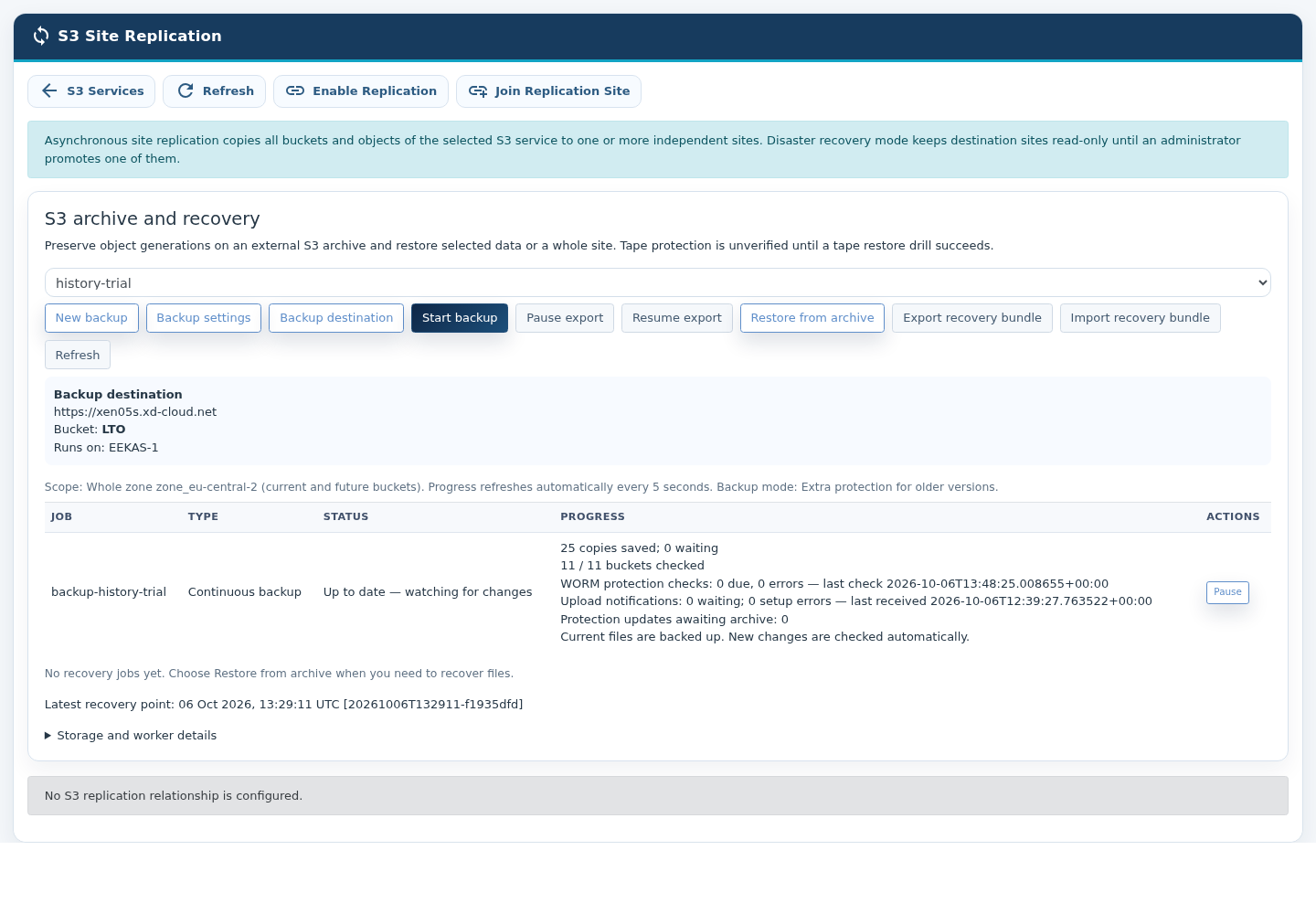
Select the backup and Refresh. States distinguish Starting backup, Copying files, Checking source files, Creating recovery point and Up to date — watching for changes. Check worker heartbeat, errors/retries, saved/waiting counters and latest completed checkpoint. Worker unavailable needs investigation at the selected node. Inventory continues if notification registration needs attention.
Recorded archive status and published checkpoint; earlier navigation wording may differ.
Pause export finishes current work before stopping; Resume export continues. Uploaded objects become part of supported recovery only when the next eligiblefull node.catalogue Clientsfinishes. shouldA reconnectcopy usingacknowledgment or quiet queue does not prove physical tape completion or verification.
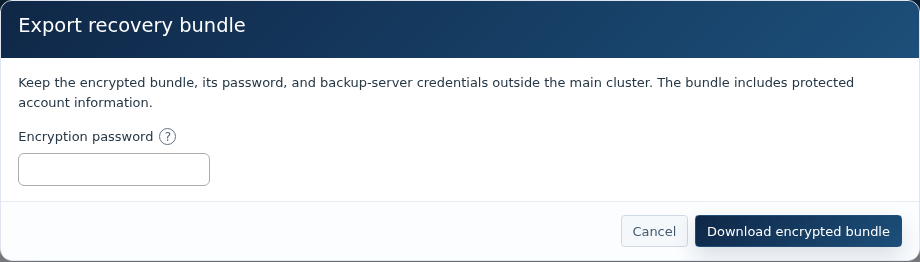
Choose Export recovery bundle.
Use an encryption password of at least 16 characters and download the samebundle.
DNS
Keep namebundle, password and servicearchive address.access Clientinformation timeoutoutside the primary cluster; store password separately. Protect them as credentials.
Refresh recovery information after configuration changes and retryrehearse policyimport influenceon an isolated replacement.
Encrypted recovery-bundle export.
8. Restore a checkpoint
Prepare a working replacement S3 service and credentials able to create/read/write recovery buckets. WORM requires supported protection operations.
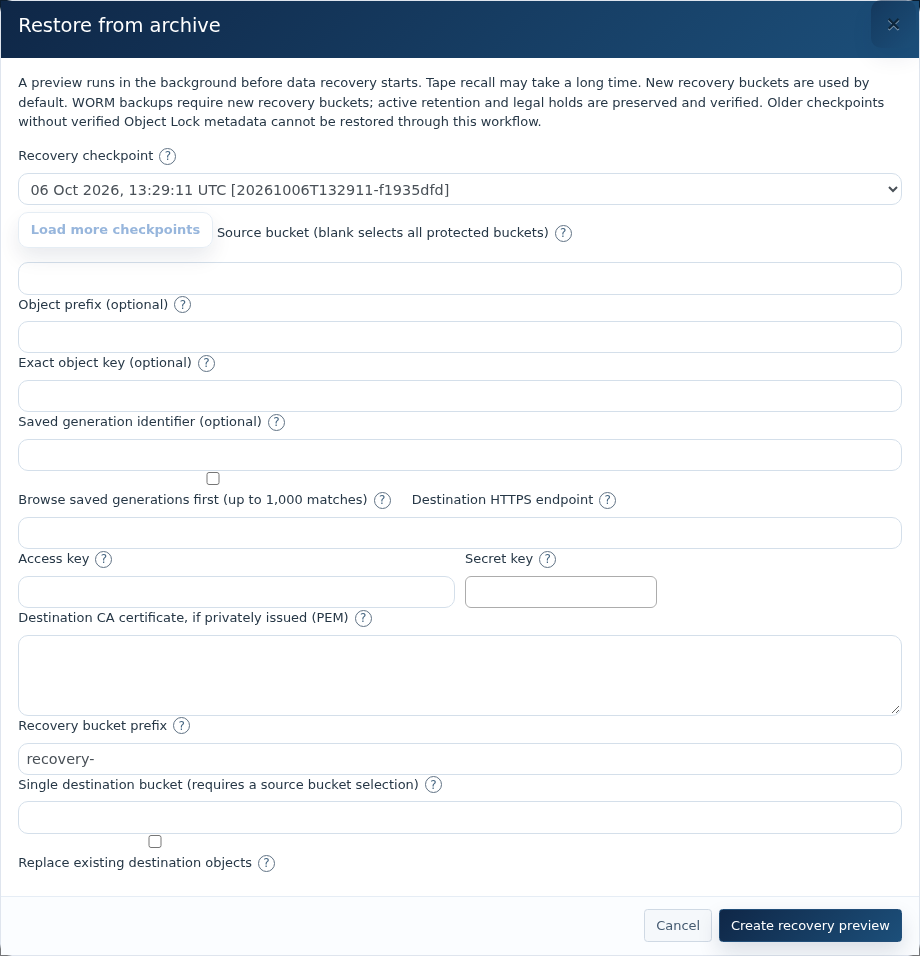
Choose Restore from archive and a completed checkpoint by its UTC date; the visibleoriginal interruption.identifier
appears in brackets. Load more if needed.
DoLeave Source bucket empty for all protected buckets, or restrict by bucket, literal prefix or exact object key. Prefix is not createa wildcard. Browse saved generations for older copies; preview is limited to 1,000 matches.
Enter destination HTTPS endpoint, credentials and private CA chain where needed. Use a separate applicationrecovery credentialsbucket prefix, such as recovery-. A single target bucket requires one source bucket.
Keep replacement of existing objects disabled unless needed for eachunprotected localdata. gateway;WORM recovery requires new buckets regardless of overwrite settings.
Create recovery preview; inspect counts, conflicts, unavailable generations and protection information before starting.
Start the gatewaysreviewed servejob and monitor progress, failures, pause/resume or cancellation.
Verify bytes, retention and legal holds. Review bucket-configuration preview before applying ownership and permissions. Original ownership can remove the samerecovery S3account’s service.
access;
Monitorlifecycle theexpiration servingstays nodedisabled andduring gateway health after maintenance or failover.
Test local failover separately from site disasterconfiguration recovery.
Restore client routing
Siteand outageSMB procedure
gateway/share configuration after content and permissions pass validation.
Recorded archive restore setup with UTC checkpoint and original identifier.Recorded recovery jobs and bucket-configuration recovery; inspect counts and failures.
AUse sitenew promotionbucket isnames arather controlledthan disaster-recoverydeleting decision,WORM buckets or weakening retention. Older checkpoints without verified Object Lock metadata are refused. Independently restored objects need not anretain automaticoriginal responseS3 toversion temporaryidentifiers.
After loss of connectivity.
Confirm the primary siteinstallation
cannotcontinue serving writes. Exclude
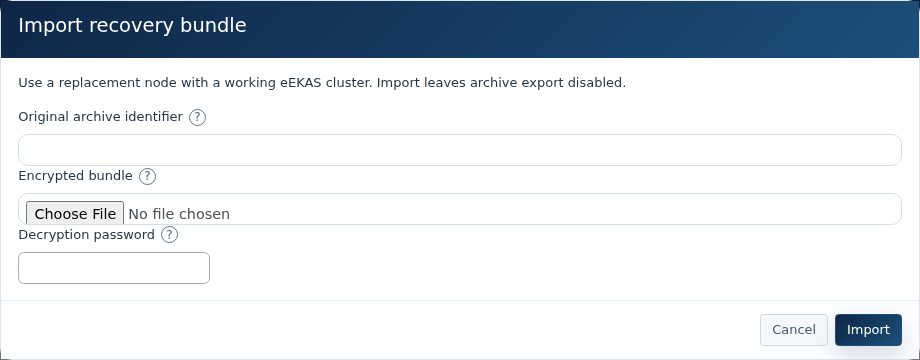
Prepare a networkworking partitionreplacement oreEKAS isolatedinstallation management-pathand failure.S3 service, worker connectivity and staging disk.
RecordChoose the last known replication state and business approval for theImport recovery action.
bundle;
Verify the destination cluster, storage, gateways, endpoint and capacity are healthy.
Use the approved promotion control for the local secondary site. If the GUI does not present a promotion control, stop and update to a software release that provides the approved workflow or contact euroNAS support; do not improvise a second write site.
Redirect application DNS or load-balancer traffic only after the promoted endpoint is confirmed writable.
Before returning service toprovide the original site,archive followidentifier, encrypted bundle smaller than 16 MB and password.
The imported configuration is recovery-only with export disabled. Verify archive connection details and keep export disabled during recovery.
Preview and restore the checkpoint, recover reviewed bucket settings, validate namespace/permissions and cut over clients.
Recovery-bundle import on a plannedreplacement resynchronizationinstallation; export starts disabled.
The bundle is not a standalone generic-server restore application. Slow/offline media may require long recall waits; obtain and role-reversaltest procedure.the Neverprovider’s permit uncontrolled writes at both sites in disasterphysical-media recovery mode.procedure.
Common9. issuesTroubleshooting and acceptance
GUI observationSymptom
LikelyCheck cause
/
Safe responseaction
No destination service is listed
No empty S3 service exists, or the service contains a bucket.destination
Create a new empty destinationfresh S3 serviceservice; anddo refreshnot thejoin page.a populated namespace.
Invitation cannot be redeemedrejected
TokenExpiry/use, expired/used,REST port 18443 blocked, address incorrect or certificate trust failed.
Create a new invitation; verifyAPI, management reachabilityaddress/18443, routing and certificate identity.trust.
Stop application writesaccess and verifystaging the topology immediately.space.
S3Notification addresserrors does/ notold answer after node failurecheckpoint
IPRegistration, Groupreachability, orinventory gatewaylag, healthfull issue.catalogue progress and backlog. Upload and checkpoint publication are separate.
Empty bucket-search page
CheckContinue if Next page is available; bounded search may examine only part of the IPcatalogue.
Group
serving
node
Restore conflicts
New names, target protection support, permissions, Object Lock metadata and clusterunavailable resourcegenerations.
health.
SMB users cannot see restored data
Gateway endpoint, bucket/path mapping, credentials, shares and identity configuration.
SMB data
Policy,enters credentialsprotection only after the gateway commits an S3 object. Open/buffered files, SMB share definitions, identity services and planneddistributed recovery
SMB
Primary-only controlslocks are deliberatelynot hiddencovered atby aobject secondaryreplication site. Use the primary relationship view to choose replicated buckets, schedule a pause or rotate synchronization credentials.alone.
UseTest Replicationdedicated Policybuckets: tosmall/large protectobjects, allmultipart bucketsdata, ormetadata, anrange explicitreads, selection; review it after bucket changes.
Complete all four credential-rotation stagesbytes and wait for synchronized status before finalizing the previous key.
Use Test Disaster Recovery to validate readiness without making the secondary writable.versions.
For anactive-active, outage,verify excludeboth adirections, networkoverwrites, partition,deletions stopand original-primarysame-key conflicts with versioning enabled.
Test retention/legal holds and recovery without weakening protected source data.
Interrupt connectivity, make controlled writes, review lagreconnect and thenverify use Controlled Promotion.catch-up.
AfterRehearse thefencing, formerpromotion, siteclient returns, use Refresh Topology; success is reported only after stable gateways and a reachable endpoint.
Validated release behavior
Validation used two independent three-node clusters, 1,000 small objects, a 32 MB multipart object, versioning and replicated deletion. A representative new object became readable at the secondary after approximately 12 seconds. This is a laboratory observation, not a performance guarantee.
All three gateways at each site remained active.
Writes at the read-only secondary were rejected.
Failoverrouting and failback preservedin theisolation; single-writertest role.local gateway recovery separately.
UnsafeExport/import promotion,a destructive removalbundle and active-activerestore withouta requiredcompleted acknowledgementscheckpoint wereinto rejected.new buckets; validate ownership and SMB user access.
GUIMeasure backfill, full catalogue duration, worker memory/disk, backlog and RESTrestore APItime workflowsfor wererepresentative validatedcounts afterand recovery.object sizes.
The evaluation
Change management
Takecovered a configuration1,000-object recordbaseline and confirmselected synchronizednative statereplication, before maintenance.
Perform one infrastructure change at a timeWORM and verifyinterruption bothcases. sitesMillion-object afterward.
capacity,
Dototal-cluster notrecovery/failback, renamecomplete endpointSMB DNS records without updatingoperation and validatingnew theexternal completemirror topology.
Daily: check every native site, export heartbeat, latest completed checkpoint, errors and alert delivery. After changes: verify hostnamescope, resolutionfuture-bucket oncoverage, allcredentials, nodes.trust,
Renew certificates before expiryrouting and bundle currency. Regularly: test withreads, a non-production client.
Maintain an independent backupprotection and periodically test restoration independently of replication.
Acceptance checklist
Both clusters are healthy.
Primary and secondary site names are correct.
Destination mode is read-only disaster recovery unless explicitly approved otherwise.
Relationship status is synchronized.
Test object creation, destination read and replicated deletion succeed.
Destination writes are rejected in DR mode.
Local gateway failover has been tested at both sites.
Monitoring, alerting, capacity thresholds and certificate expiry checks are enabled.
Promotion authority, client redirection and failback steps are documented.
Independent backups are configured and restoration has been tested.
Advanced policy, monitoring and recovery
The Replication Policy window is divided into tabs so advanced controls remain readable on lower-height displays. Use the graphical interface to configurerecovery, and review everycapacity. item.
Before
Advanced Rules: create one-way or two-way rules; select source and destination sites and buckets; optionally filter by object-key prefix or object tags; map destination ownership and storage class.
Protection: mirror deletions,decommissioning:
retain versioned objects, delay deletions in a scheduled external archive, or use copy-only protected archive mode. The interface validates required versioning and Object Lock before accepting those policies.
Monitoring and Alerts: configure email, existing cluster notifications, webhooks and Prometheus metrics. Operations shows per-bucket inventory, failures, RPO history and capacity forecast.
Backfill Existing Objects: start background reconciliation after adding or changing a rule. Open Backfill Jobs to follow progress, pause, resume or cancel safely.
Recovery: validate readiness before promotion. Optional protected hooks, a validation URL and a DNS/load-balancer integration can be combined into an auditedverified recovery workflow with rollback.
External Archive: configure a neutral destination name, S3-compatible address, bucket, credentials, copy/sync mode and schedule. Credentials remain protected and are not shown again.
Compliance Report: create downloadable PDF and CSV evidence from Operations. Reports include topology, synchronization state, policy, bucket inventory and event count.