
Customer Storage, Billing and Usage
The Customer Storage / Billing tab connects S3 administration with customer-oriented service workflows.
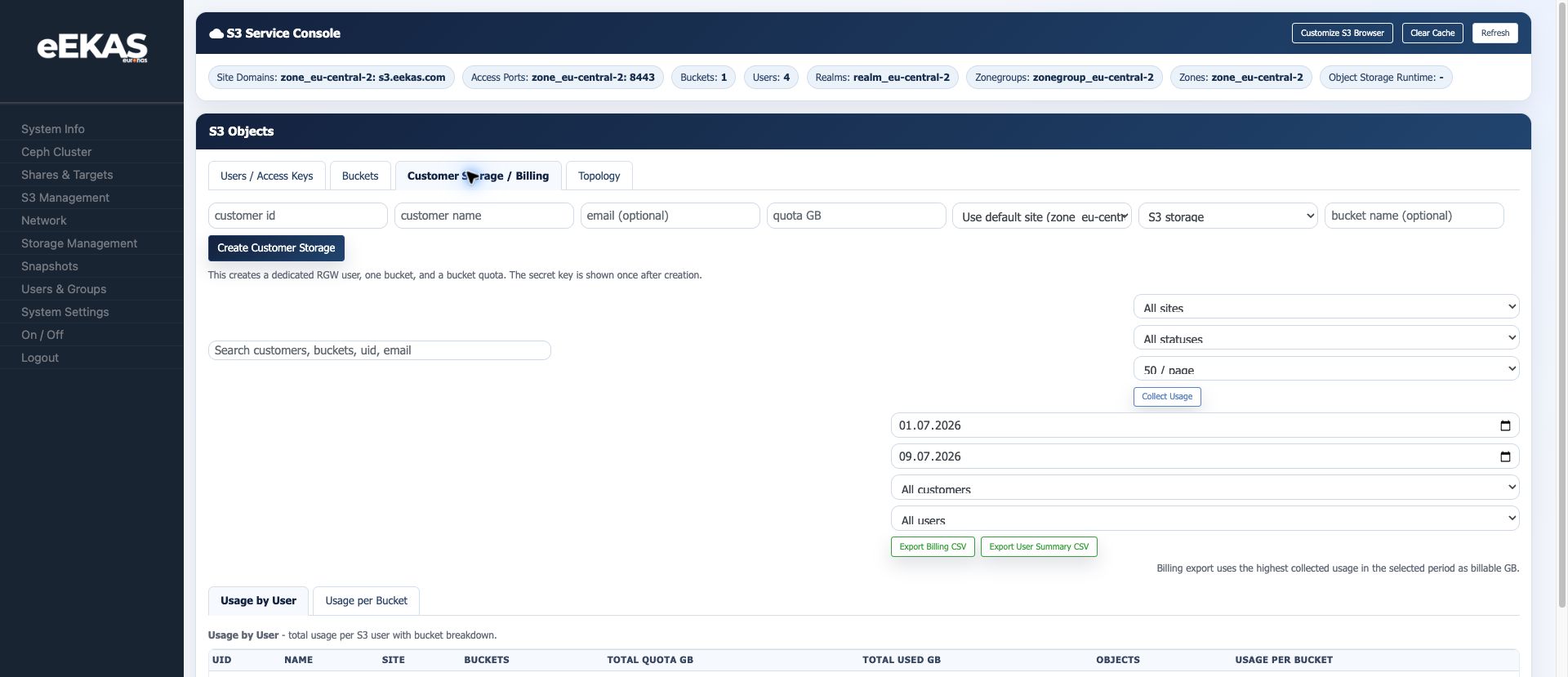
Customer Storage Provisioning
This workflow can create a dedicated customer storage record. The console states that it creates:
- A dedicated RGW user.
- One bucket.
- A bucket quota.
Available fields:
| Field | Description |
|---|---|
| Customer ID | Internal or billing-related customer identifier. |
| Customer name | Human-readable customer name. |
| Optional customer email. | |
| Quota GB | Storage quota assigned to the customer storage record. |
| Site | Site/zone context. |
| Storage type | For example S3 storage. |
| Bucket name | Optional explicit bucket name. |
The secret key is shown once after creation. Store it securely and avoid sending it through insecure channels.
CurrentVerify Testcustomer Finding: Customer Storage User Loginaccess
InAfter provisioning, verify the livebucket, testenforced on 2026-07-09, a customer storage record created the expected customer-style userquota and bucket,an butobject read/write using the generated credentials. Test the S3 Browser login didbefore nothandover. workFor forfailures, that customer-storage-created user. A normal user created fromcheck the Users tab, named backup-service, could log in successfully with the same S3 Browserendpoint, login workflow.
Until this is fixed or explained, document the following operational workaround:
Create end-user S3 accounts from theUserstab when browser access must be handed to a customer immediately.Use Customer Storage / Billing for billing workflow validation, quota modelingcredentials andusage collection.Verify that a Customer Storage-created user can log in before sending credentials to a real customer.If the Customer Storage-created user fails but a normal Users-tab user works, treat the Customer Storage provisioning path as the likely bug candidate.
Usage Collection
The billing area provides filters and collection controls:
- Start date.
- End date.
- Customer filter.
- User filter.
Collect Usage.
The usage report can be viewed by user or by bucket.
Billing Exports
The interface provides:
Export Billing CSVExport User Summary CSV
The note in the console is : billing export uses the highest collected usage in the selected period as billable GB.
When to Use This Workflow
Use customer storage records when eEKAS is used as a managed storage service or internal chargeback platform. This workflow is better than manually creating unrelated users and buckets when reporting, quotas and ownership need to stay aligned.
Operational Recommendations
- Use consistent customer IDs that match CRM or billing systems.
- Define quota and bucket naming conventions before onboarding customers.
- Collect usage on a fixed schedule.
- Keep exported CSV files aligned with the billing period.
- Rotate credentials when customer responsibility changes.
- Test the created credentials in the S3 Browser before handover.
DocumentationStorage Exampleand Namestraffic billing
ForSchedule screenshotsstorage sampling regularly. The five-minute traffic collector does not sample storage peaks; objects created and examples,deleted between storage snapshots can be missed. Values labelled GB represent GiB. For billable customers, the storage charge is the greater of sampled period peak times storage price and the minimum charge. Enabled upload and download charges are added separately. The minimum applies to storage only.
Tracking and new customer traffic accounting begin at the next full UTC hour. Recent hours may remain provisional. Review coverage, last collection and warnings before approving charges. Missing counters mean unavailable usage, not zero usage.
Billing periods include both dates in UTC. A multi-month range uses one storage peak and one minimum, rather than summing monthly invoices. Keep totals separated by currency.
Prices, billing status and access
active and suspended remain billable. trial, cancelled and do_not_bill produce zero charges. Billing status does not revoke S3 access. Current prices and status also affect historical reports; retain approved exports outside the installation.
Customers on replicated or recovered installations
Object replication does not automatically copy customer registries, tariffs or historical billing ledgers. Register existing users and buckets with POST /api/v1/object-storage/customers/adopt rather than provisioning them again. The UID must match the existing bucket owner. Adoption records the agreed quota without changing its enforcement.
Cross-installation billing is opt-in. It charges the maximum logical storage peak once, adds traffic from distinct accounting zones and uses the designated pricing owner's tariffs. Check peer availability, coverage and currency. There is no automatic accounting failover or invoice finalization after a disaster.
Internal archive transfers
Managed archive reads use namessystem thatcredentials lookat likethe source and are excluded from customer gateway usage logs. External uploads and recovery requests can still be billed at their destination according to its customer and billing configuration.
Automate customer management
Follow S3 Customer Management, Usage and Billing via REST API for provisioning, quota changes, sampling, CSV exports, adoption and cross-installation billing. Check partial failures even with HTTP 200. API CSV exports return CSV content inside a realJSON customer workflow instead of internal test names.response.
Recommended neutral examples:
| |
| |
| |
| |
|
Avoid internal names such as automation tool names, developer names or temporary debugging labels in screenshots that will be published.
Source: eEKAS live test cluster and supplied euroNAS eEKAS documents, prepared on 2026-07-09.