
Hyperconverged Ceph for virtualisation
Run virtual machines and distributed Ceph storage on the same eEVOS hosts. The architecture removes the need for a separate storage array, distributes data across host failure domains and brings compute, storage, high availability and VM protection into one operational platform.
Add compute at any time: compute-only nodes automatically use the existing Ceph storage.
Compute and storage share the cluster
Each participating eEVOS host can run virtual machines and contribute local storage devices to the Ceph cluster. Ceph distributes VM data across multiple hosts according to the selected protection policy and failure-domain design.
This is a scale-out model: adding a storage-contributing node increases compute resources, storage capacity and aggregate I/O capability. If additional compute is required, eEVOS compute-only nodes can be added at any time without local Ceph storage devices. They automatically use the existing Ceph storage for their virtual machine disks.
One cluster, two resource layers
Virtual machines consume compute resources on eEVOS hosts while their virtual disks reside on the distributed Ceph storage layer. Ceph clients communicate directly with storage daemons; data placement is calculated from the cluster map rather than routed through a central storage controller.
Ceph services
Local NVMe / SSD
Ceph services
Local NVMe / SSD
Ceph services
Local NVMe / SSD
Distributed Ceph storage
VM blocks are distributed across OSDs according to pool policy and CRUSH failure-domain rules.
Monitors maintain cluster maps and quorum. OSDs store data, replicate it and participate in recovery and rebalancing.
Conceptual diagram. Exact service placement, replica policy, network separation and node count are determined during sizing.
Three decisions shape the result
01
Failure domains and data policy
Define which failures the cluster must tolerate. A typical production design uses at least three independent host failure domains with three replicas; the final baseline depends on quorum, pool and availability requirements.
02
Resource separation
CPU, memory, PCIe bandwidth and storage media are shared by VM and Ceph workloads. Reserve resources for storage services, recovery and maintenance instead of sizing only for steady-state VM demand.
03
Network architecture
Design redundant paths and sufficient bandwidth for VM traffic, storage I/O, replication, recovery, live migration and management. Network latency and congestion affect the entire cluster.
Why organisations choose HCI — and what they accept
Where it is strong
- No separate shared-storage array is required.
- Compute and storage can grow incrementally across standard server hardware.
- Data is distributed across defined failure domains rather than tied to one controller pair.
- VM migration, HA, virtual networking and storage are operated from the eEVOS environment.
- Add compute-only nodes at any time without adding storage; they automatically use the existing Ceph storage.
- eEVOS VM Backup, Instant Backup & Recovery and off-site DR can protect the virtualisation layer.
What must be planned
- Compute and storage workloads compete for host and network resources.
- Taking a host down removes both VM capacity and storage capacity at the same time.
- Recovery and rebalancing create substantial additional I/O and network traffic.
- Capacity headroom is required; a nearly full distributed cluster is an operational risk.
- Hardware asymmetry, slow media or a weak network path can affect cluster-wide latency.
- The operational model is more complex than a single server or synchronous two-node mirror.
The network is part of the storage system
Ceph clients contact OSDs directly and OSDs also exchange data for replication, recovery and rebalancing. A resilient design therefore treats switching, cabling, NICs and path redundancy as storage components.
Front side
VM and client traffic
North-south application traffic, administration and access to virtual services. Segment with VLANs and policy according to the security design.
Storage
Ceph public traffic
VM storage I/O and Ceph client-to-OSD communication. Size for workload latency and throughput, not only link speed.
Back side
Replication and recovery
A separate Ceph cluster network may isolate heartbeat, replication and recovery traffic when the workload and resilience model justify the added complexity.
Plan for normal operation and degraded operation
Hyperconverged is one option, not the default answer
| Decision | eEVOS with Ceph HCI | eEVOS with shared storage | Dedicated eEKAS Ceph storage |
|---|---|---|---|
| Primary role | Virtualisation Compute and Ceph storage on the same cluster. | Virtualisation eEVOS compute with a separate shared-storage system. | Storage service Dedicated scale-out block, file and object storage for independent consumers. |
| Scaling model | Add compute and storage together, or add compute-only nodes at any time; compute-only nodes automatically use the existing Ceph storage. | Scale compute and storage independently. | Scale storage capacity and services independently of the virtualisation platform. |
| Best fit | Organisations seeking an integrated virtualisation stack without an external array. | Sites with an existing SAN/NAS strategy or strict separation of compute and storage. | Shared enterprise storage, S3/object use cases and multiple client platforms. |
| Operational boundary | One eEVOS environment for VM lifecycle, HA, storage and VM protection. | eEVOS plus the operational model of the external array. | Dedicated storage operations and service endpoints; virtualisation remains separate. |
A comparable HCI principle, not feature equivalence
What is architecturally similar
Both approaches aggregate local devices across multiple virtualisation hosts and present distributed storage to virtual workloads. Compute, storage devices and the storage network jointly determine platform behaviour.
This makes eEVOS with Ceph a relevant architectural alternative when an organisation is reviewing a vSAN-style deployment model.
What should not be inferred
eEVOS with Ceph is not VMware vSAN and the products are not feature-identical. Storage policy semantics, lifecycle workflows, compatibility rules, management integrations and operational tooling differ.
A migration decision should compare required workload behaviour, recovery objectives, hardware support, day-two operations and backup strategy — not just licence cost.
eEVOS in Action
The screenshots show the operational layer around the architecture. Select an image to view it at full size without leaving the page.
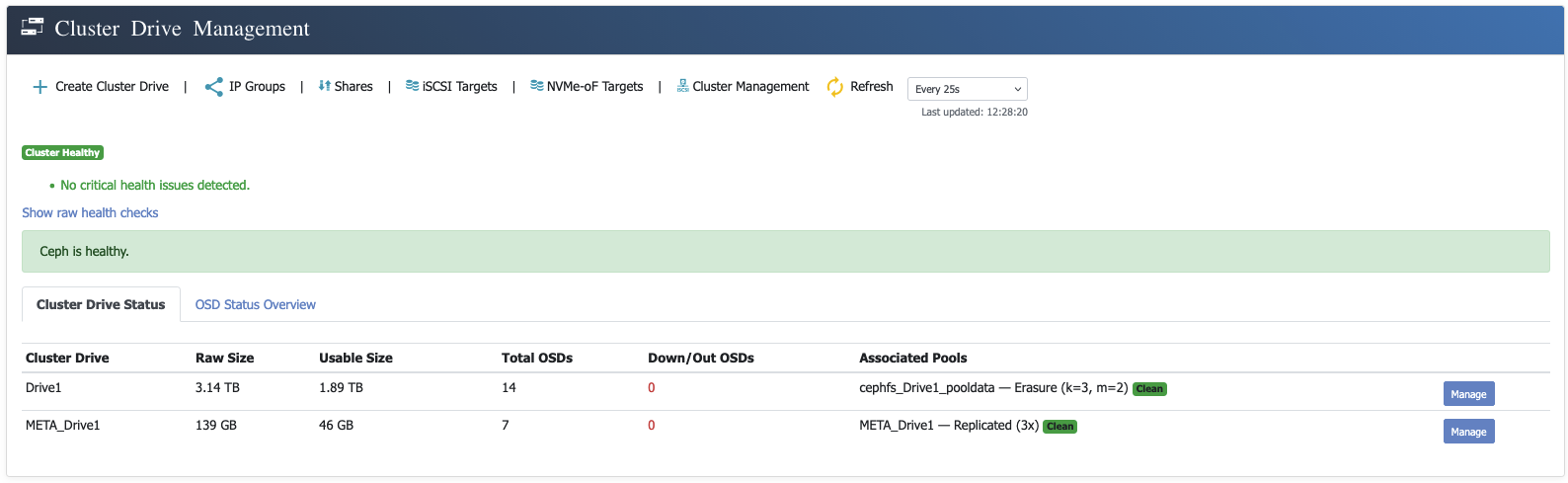 Ceph Cluster Drive ManagementView cluster health, raw and usable capacity, OSD status and associated Ceph pools in one place.
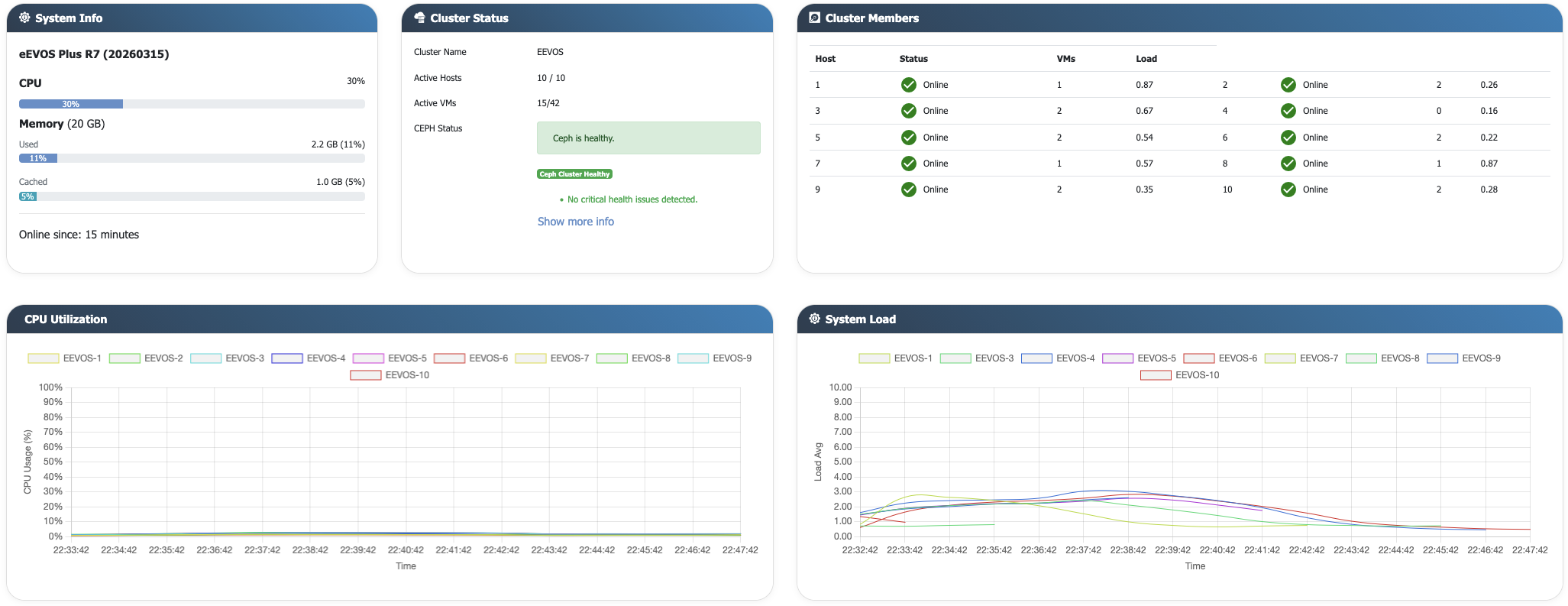 Multi-node dashboardCluster-wide visibility for hosts, virtual machines and resource state.
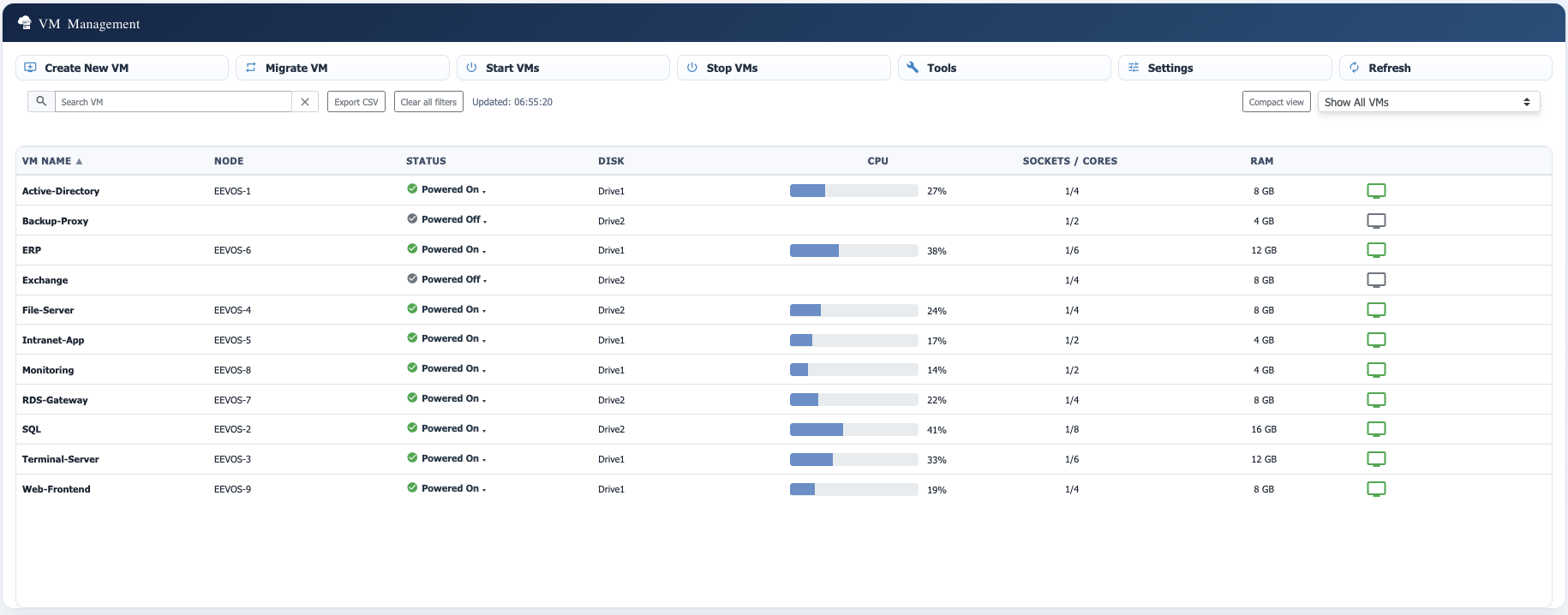 Virtual machine managementVM lifecycle and placement from the eEVOS management interface.
Architecture should be evidence-based
Ceph documents direct client-to-OSD communication, CRUSH-based data placement, replicated pools and configurable failure domains. Its network guidance also explains the additional load created by replication and recovery. VMware describes vSAN as distributed storage that aggregates local devices across cluster hosts; this supports the architectural comparison above while leaving product-specific behaviour distinct.
Ceph Architecture • Ceph Network Configuration Reference • Broadcom: understanding vSAN performance and architecture
Discuss the right architecture for your workloads
We can review node roles, failure domains, network design, usable capacity, recovery behaviour and whether hyperconverged Ceph, shared storage or a dedicated eEKAS cluster is the better fit.